

Rapid Screenshot is a redesigned and efficient screenshot app.
Modern cell phones show more and more content on the screen, and when taking a screenshot we usually want to capture only a specific part of the screen and not the whole screen.
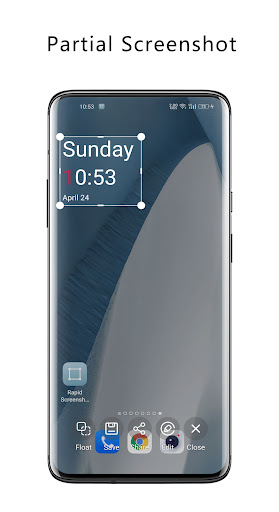
With the [Partial Screenshot] feature to take, share or edit screenshots with one click by directly delineating the part you want to capture with a floating layer.
And with the Auto-Crop feature, you can even extract elements from the screen with one click without the need to crop.The app uses Material You design language, perfectly supports night mode and dynamic color, and the app theme color can be changed automatically according to your wallpaper color (Android 12 and above).Main features.1.
Partial ScreenshotUse the floating layer to select the content you are interested in and capture, share or edit the screenshot with one click.2.
Auto-CropThe application can automatically identify and extract the content you are interested in.3.
Floating buttonUse the floating button to trigger a screenshot, and support custom click, double click, and long-press actions.4.
Floating imagesFloat multiple screenshots to the screen for viewing at any time.5.
Drag and drop sharingShare the floating image to other apps by drag and drop gesture.Note: The auto-crop function is based on the accessibility service
https://andro.io/app/xcapture


Rate this app
How do you feel about Rapid Screenshot?
Thanks for your feedback!
> 2.2k
Monthly Downloads
~$900
Estimated Cost
Screenshots









