
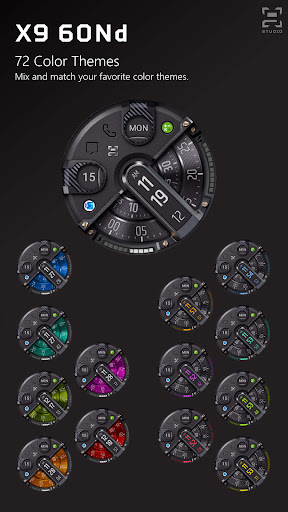
Premium Wear OS digital watch face by X9 Studio.Watch Face Features:72 Possible Color CombinationGyro EffectsAdvanced Battery Indicator4 App shortcuts2 Custom App Shortcuts10K Steps Goal Meter*Supports 12H & 24H FormatEnergy Efficient AODCustomization:Touch and hold the displayTap on customize optionSupported Devices:Wear OS 2.0 (API Level 28) or higher.
Please contact [email protected] if your supported device is not recognized by Google Play.Download Issues:Watch Face category is new on Google Play and it still have some download bugs.
If youre having trouble purchasing/downloading watch faces from mobile Google Play app, then please visit Google Play store from Chrome browser on your phone or computers.Tips:Make sure your watch and phone are properly paired.Make sure your watch meets the Wear OS version.*Wear OS Watch Face Health Sensors Tracking:Wear OS watch faces track watch’s health sensors independently, therefore the results on watch face are different from health apps on your phone.
This is a privacy protection feature of Wear OS.Steps goal is 10,000 steps, a recommendation from American Heart Association.
It cant be changed, well update the watch face if future Wear OS version enables the functionality.Connect With X9 StudioWEB:https://x9studio.com/NEWSLETTER:Sign up to stay updated with new watch faces and promotions!https://x9studio.com/newsletter-signup/FACEBOOK:https://www.facebook.com/X9StudioLLCINSTAGRAM:https://www.instagram.com/x9_studio/PINTEREST:https://www.pinterest.com/x9studio/TWITTER:https://twitter.com/x9studio1/Be sure to check out X9 watch face collections.
https://andro.io/app/x9018
 Power 100



Android app profile
X9 60Nd: Digital Watch Face for Android – Latest Version & Features
by X9 Studio
★★★★★
(0 ratings)
Rate this app
How do you feel about X9 60Nd: Digital Watch Face?
Thanks for your feedback!
> 2.2k
Monthly Downloads
~$900
Estimated Cost
Screenshots




