

Main Features:1.
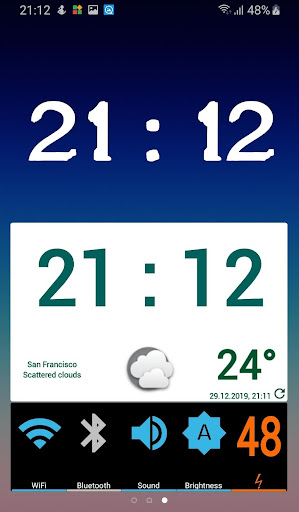
Weather and Clock Widget with Forecast screen2.
Weather information based on predefined or current location3.
Power Widget with Multiple Toggle Widgets (WiFi, Mobile Data, Ringer, GPS, Bluetooth, Airplane Mode, NFC, Sync, Brightness, Orientation, Flashlight, Battery)4.
Battery Notification5.
Single Battery Widget6.
Single Toggle WidgetsCurrent location for weather requires apps access to location in the background.Zoromatic Widgets are set of multi-functional widgets for Android 2.2 and higher.
To add any of available widgets to your home screen, long tap the screen, select Widgets from menu, and then select Zoromatic Widgets.All activities have fully configurable theming applied.Weather and Clock Widget is highly configurable, with separate settings for each widget.
Some of available custom options are:- Clock color- Clock font- Clock skin- Background color and transparency- Date format- Weather settingsWeather settings include:- Custom Weather icons- Temperature scale (Celsius, Fahrenheit)- Location settings (Current location - using GPS or network, or multiple Custom locations)- Refresh interval (30 minutes to 6 hours)- Use WiFi only for scheduled refreshTap on hour to open system clock and alarm application.Tap on weather icon to open weather forecast, for multiple defined locations.Tap anywhere else to open widget configuration screen.Date and weather information can be hidden, so widget turns into Clock Widget only.Power Widget is highly configurable, with options to set:- Show or hide multiple toggle widgets- Background color and transparency- On, Off and Transition colors- Colors and thresholds for different battery levelsApplication also provides Battery Notification in status bar.
Start Zoromatic Widgets from Application drawer and select option Show Battery Notification.
Select type of Battery Notification presentation: icon or text.Some toggle widgets work automatically only if allowed by the system (GPS, Mobile Data, Airplane, NFC).
Toggle Mobile Data works automatically on Lollipop for rooted devices.Contact me on [email protected].
https://andro.io/app/widgets-19ifn


Rate this app
How do you feel about Zoromatic Widgets?
Thanks for your feedback!
> 2.2k
Monthly Downloads
~$900
Estimated Cost
Screenshots









