
Version 3 of the Waterfall Estate Community Portal application has been completely redeveloped.
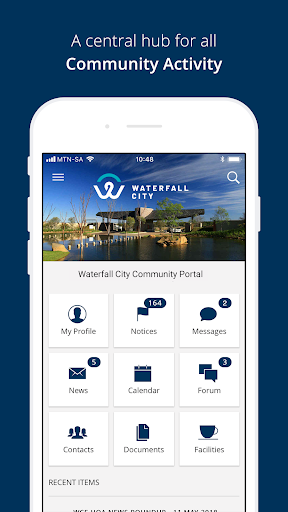
View all content in-app, log in and see the updated features!* Login- The Login page requires the user to enter their email and password credentials- The user must agree to the terms and conditions as set out by the estate before they can continue with the login process- The user can use the “Remember Me” function to store their credentials on the device, which will prefill their login fields the next time they launch the app* Dashboard- The Dashboard page is the first page that is presented to the user after login.- From here the user can access the most prominent features that the app provides.
Other features can be accessed from the side menu.- Recent Items are the most recent items available in the News, Notices, Messages, and Events categories.The following are accessible from the Dashboard* Profile- The Profile page allows the user to view and edit information related to their portal profile.
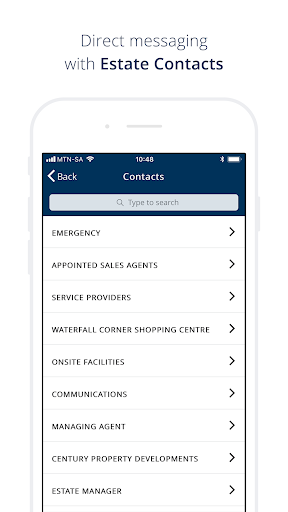
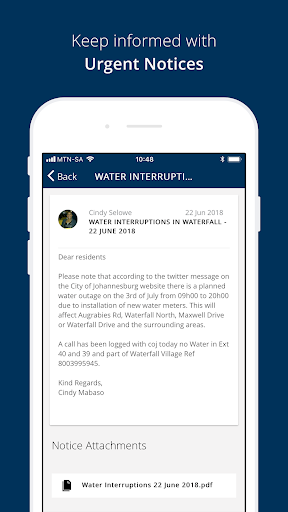
- Any information that is changed here will reflect on the web portal as well.- Owners / Residents / Non-Residents / Staff- Allows the user to view the different types of users associated with their profile- Accessible from the side menu* Notices- The Notices page allows the user to view important notifications that the estate provides.* Documents- The Documents page allows the user to view important documents that the estate provides.* Contacts- The Contacts page allows the user to view the contact information of people and organizations affiliated with the estate.- The user can also save any contact information on this page to their device contact list.* Messages- The Messages page allows the user to send and receive messages to certain contacts that are affiliated with the estate.* Forum- The Forum page allows the user to view and post messages to discussion forums that are supplied by the estate.* Calendar- The Calendar page allows the user to view and save events to their device calendar that are provided by the estate.* Facilities- The Facilities page allows the user to view the details of all the facilities that the estate provides.* News- The News page allows the user to view important news articles that relate to the estateThe following are accessible from the side menu* Marketplace- The Marketplace page allows the user to view vendors that are affiliated with the estate.* Polling- The Polls page allows the user to view and participate in polls provided by the estate- Accessible from the side menu* Settings- The Settings page allows the user to manage several notifications settings.- Only accessible from the side menu* Help- The Help page provides the user with several help topics and answers to frequently asked questions.* Search- The Search page allows the user to search across all topics.* Logout- The user can log out from the side menu.
https://andro.io/app/waterfallestate
 Power 100

Android app profile
Waterfall City CommunityPortal for Android – Latest Version & Features
by Real Estate Development Interactive
★★★★★
(0 ratings)
Rate this app
How do you feel about Waterfall City CommunityPortal?
Thanks for your feedback!
> 2.2k
Monthly Downloads
~$900
Estimated Cost
Screenshots









