

Voice Notify announces status bar notification messages using Text-To-Speech (TTS) so you dont need to look at the screen to know what a notification says.FIX FOR XIAOMI: Xiaomi devices have a restriction that by default causes Voice Notify to randomly stop working.
To fix it, go to Settings -> Apps -> Permissions -> Background Autostart -> enable Voice Notify.
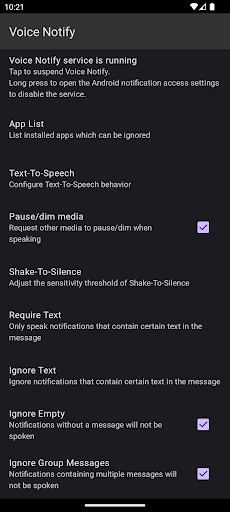
This may be different for some versions of the OS.FEATURES:*Widget to suspend VN*Customizable TTS message*Limit length of spoken message*Replace text to be spoken*Ignore specific apps or notifications containing defined text*Choice of TTS audio stream*Choice of speaking when screen or headset is on or off, or while in silent/vibrate mode(Note: Due to API limitations, a headset that is connected when the VN service starts will need to be reconnected for VN to see the current state; also all Bluetooth devices are detected the same, headset or not)*Quiet Time*Shake-to-silence*Custom delay of TTS after notification*Repeat notifications at custom interval while screen off*Notification log*Post a test notificationVN operates through Androids Notification Listener service and must be enabled in the Notification Access settings.Shortcuts are provided in the configuration screen to open the Notification Access and TTS settings.PERMISSIONS:Bluetooth - Required to detect whether Bluetooth headset is connected.Vibrate - Required for Test feature while phone is in vibrate mode.Modify Audio Settings - Required for improved wired headset detection.Read Phone State - Required to interrupt TTS if a phone call becomes active.ABOUT AUDIO STREAM OPTION:Behavior of audio streams may vary by device or Android version, so I advise doing your own testing to determine which stream is right for you.
The Media stream (default) should be good for most people.DISCLAIMER:Voice Notify developers are not responsible for the notifications that are announced.
It is up to you to configure VN or your device, or not use VN, to prevent unwanted announcing of notifications.PROBLEMS:Please email me or submit any issues at:https://github.com/pilot51/voicenotify/issuesIf necessary, you can sideload any version from the releases section on GitHub:https://github.com/pilot51/voicenotify/releasesSOURCE CODE:VN is open source under the Apache License.
https://github.com/pilot51/voicenotifyCode contributor details can be found at https://github.com/pilot51/voicenotify/graphs/contributorsTRANSLATIONS:Translation is crowdsourced at https://hosted.weblate.org/projects/voice-notify.If for any reason you cant or dont want to use Weblate, you can always email me or contribute directly to the GitHub project.Complete languages: English, Indonesian, SpanishPartial languages: Czech, Dutch, Finnish, French, German, Greek, Hungarian, Italian, Malay, Polish, Portuguese, RussianA special thank you to all the developers and translators who donated their time and expertise to make Voice Notify better!
https://andro.io/app/voicenotify


Rate this app
How do you feel about Voice Notify?
Thanks for your feedback!
> 2.2k
Monthly Downloads
~$900
Estimated Cost
Screenshots









