
(1) Purpose: VanziOn refers to EOT Ware Co,.
Ltd is a dedicated app for using wearable devices, and is for health management and is not a medical device for treatment purposes.(2) Applicable Hardware Model: - EOT Ware Co,.
Ltd (model name: EOT-VANZI-V1).
- No models applied other than the above products(3) Function summary: Measures blood pressure, heart rate, oxygen saturation, body temperature, and activity level in real time and periodically using a dedicated wearable device, and transmits/stores this to the smartphone through Bluetooth Low Energy communication method.
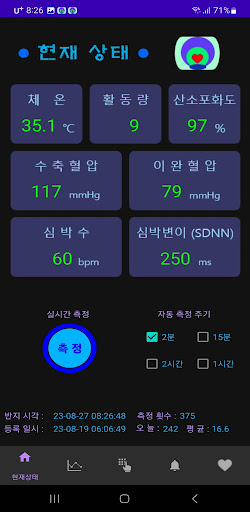
It always displays numbers and graphs, allowing users to easily monitor changes in their health status.(4) Screen page composition: Composed of 5 pages: ‘Current status’, ‘View changes’, ‘Input information’, ‘Notification settings’, and ‘Ring registration’ (see image)(4.1) Current status page: - Displays the most recently measured body temperature, activity level, oxygen saturation, blood pressure, heart rate, and heart rate variability in numerical values.
- The operating status of the wearable device is displayed as an icon in the upper right corner of the screen.
- Perform real-time measurement using the ‘Measure’ button - Select measurement cycle - Information about the time of the synchronized ring, ring registration date and time, and number of measurements is displayed at the bottom of the screen.
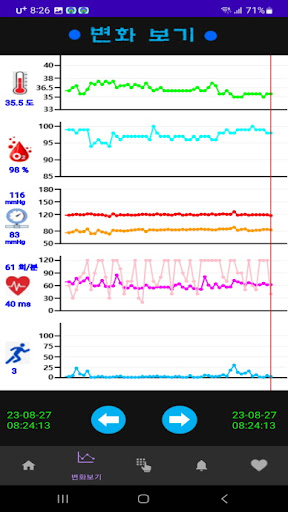
- There is a button at the bottom of the screen to move to another page.(4.2) ‘View changes’ page: - Changes over time of 5 types of measurement data stored in the database are displayed as graphs.
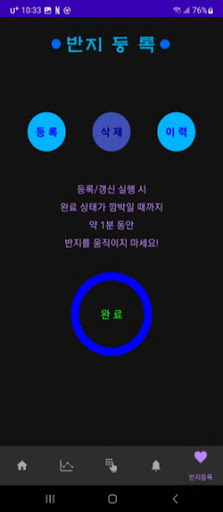
- Click the left and right arrows at the bottom of the screen to check the data value at the desired time.(4.3) ‘Information input’ screen: - Body temperature: Enter the user’s core body temperature measured with a separate standard thermometer (for body temperature correction) - Blood pressure: Enter manual and diastolic blood pressure measured with a standard blood pressure monitor (for blood pressure correction) - User ID: Enter an identification consisting of 6 characters (to match the smartphone and wearable device 1 to 1)(4.4) ‘Notification Settings’ page: - Alarm level settings for 5 types of measurements - Set sound when notification occurs - LED On-Off control of wearable devices(4.5) ‘Ring Registration’ page - Register, update, or delete matching wearable devices - Registration or update takes up to 1 minute, including sensor calibration.(5) Main operation concepts - The smartphone app VanziOn and wearable devices are matched 1:1 using the registered ID and MAC address to distinguish them from other wearable devices or other smartphones.
- When registering, you must wear a wearable device and be close to your smartphone for 1:1 matching.
- When using a wearable device during long-term activities, wear the provided band.
- Registration and measurement possible only when wearing a wearable device - After registration, if you are wearing the wearable device, measurements are performed according to the set cycle (default 2 hours) - When handing over a wearable device to someone else (changing it to another smartphone), you must execute ‘Delete’ and re-register.
- Measurements are possible even while the wearable device is charging.
https://andro.io/app/vanzionapp
 Power 100

Android app profile
VanziOn for Android – Latest Version & Features
by tgsong99
★★★★★
(0 ratings)
Rate this app
How do you feel about VanziOn?
Thanks for your feedback!
> 2.2k
Monthly Downloads
~$900
Estimated Cost
Screenshots









