
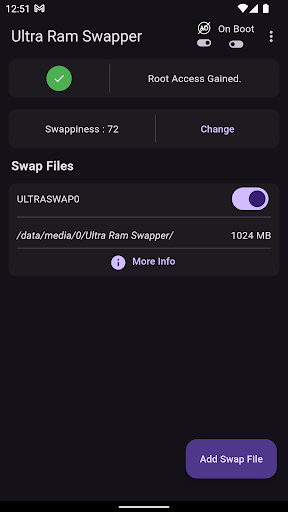
Are you tired of having to re-open apps on your android because the system keeps running out of memory?Maybe there was some really important application in the background that got killed?Or maybe you just want to multitask HARD!Well, weve got you covered!An Application to easily create, enable/disable, and delete multiple swap files(Virtual Memory) in a rooted android.Steps to use:1.
Just install the app on a rooted android.2.
Grant root permission.3.
Create a swap file(Recommended Size: Between 1 to 2 GB per file).4.
Enable file using switch.5.
Enjoy.6.
Create another if more memory needed.To check how much swap is being used, check the info button in the appbar(Swaptotal and Swapfree are the values you are looking for).Feel free to experiment with the swappiness values to suit your needs.Note 1: Requires root.Note 2: Depending upon how much swap is being used from a file, turning swap off might take really long.In such cases, when you wish to disable or remove a swap file, it is recommended to reboot the phone.Note 3: Swap turns off on reboot.
Please turn it on again after a reboot.
https://andro.io/app/ultra-ram-swapper
 Power 100


Android app profile
Ultra Ram Swapper for Android – Latest Version & Features
by The Sparks
★★★★★
(0 ratings)
Rate this app
How do you feel about Ultra Ram Swapper?
Thanks for your feedback!
> 2.2k
Monthly Downloads
~$900
Estimated Cost
Screenshots









