https://andro.io/app/translate-1ak15
 Power 100

📷 This Photo Translator app will help you translate photos, words, and phrases from any language.
This smart and reliable language translator is one of the most popular apps in its category.
🌎 This free translation app understands dozens of languages from all over the world: from Swedish to Hawaiian, from Persian to Indonesian.
To choose the one that you need, you should tap the button with three horizontal lines in the left top corner of the screen and select a language from an extensive menu.
If you dont indicate the language, the Photo Translator will identify it automatically.On the main screen of the language translator, youll see the following buttons:Translate camera, image.
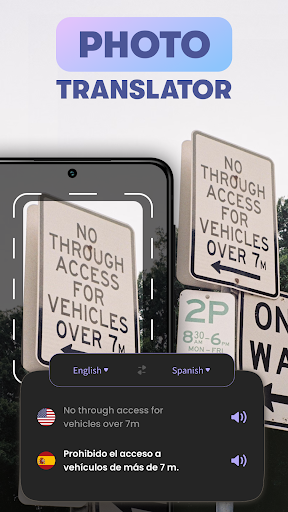
documents(scan and translate)Conversation (speak and translate)Camera translation (take pictures of documents and convert)Phrase book (learn useful expressions)Translation history (view all your history)Camera TranslatorYou might want to translate the following types of texts from photos:MenusRoad signsSchedulesBooksNewspapersEmailsConversations in messengersChatbotsAnd so onUpload an image to this picture translator from your gallery, Google Drive, Downloads folder, or other sources.
Also, you can take a new picture with your phones camera.
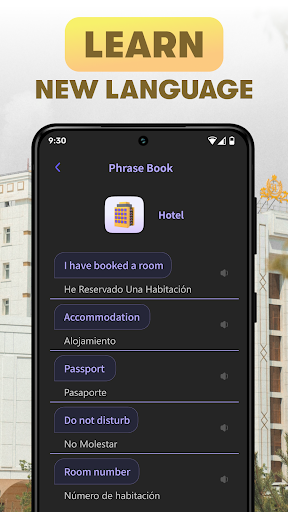
The translation will be quick and precise, no matter how difficult the text might be.When you need to quickly translate languages and the most common everyday words and phrases, the Phrase Book will come in handy.
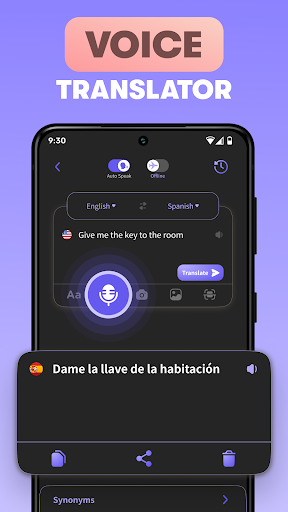
It contains such topics as Numbers, Colors, Days of the Week, Money, Shop, Transport, and so on.Speech TranslatorTo translate a voice, you should follow these simple steps:Open the Conversation section of the appUse two dropdown menus at the top of the screen to select the languages that you would like to usePush the mic button in the lower part of the screen and just speak and translateEven if you have an accent or make grammar mistakes, the Voice Translator should work perfectly.
No matter where in the world you are, youll be able to understand speech on any topic: casual dialogs, instructions, weather forecasts, songs, and so on.This Photo Translator will occupy very little space in your phones memory and consume a minimum of traffic.
Android app profile
Photo Translator - Image Scan for Android – Latest Version & Features
★★★★★
(0 ratings)

Rate this app
How do you feel about Photo Translator - Image Scan?
Thanks for your feedback!
> 2.2k
Monthly Downloads
~$900
Estimated Cost
Screenshots
About Photo Translator - Image Scan
📷 This Photo Translator app will help you translate photos, words, and phrases from any language.
This smart and reliable language translator is one of the most popular apps in its category.
🌎 This free translation app understands dozens of languages from all over the world: from Swedish to Hawaiian, from Persian to Indonesian.
To choose the one that you need, you should tap the button with three horizontal lines in the left top corner of the screen and select a language from an extensive menu.
If you dont indicate the language, the Photo Translator will identify it automatically.On the main screen of the language translator, youll see the following buttons:Translate camera, image.
documents(scan and translate)Conversation (speak and translate)Camera translation (take pictures of documents and convert)Phrase book (learn useful expressions)Translation history (view all your history)Camera TranslatorYou might want to translate the following types of texts from photos:MenusRoad signsSchedulesBooksNewspapersEmailsConversations in messengersChatbotsAnd so onUpload an image to this picture translator from your gallery, Google Drive, Downloads folder, or other sources.
Also, you can take a new picture with your phones camera.
The translation will be quick and precise, no matter how difficult the text might be.When you need to quickly translate languages and the most common everyday words and phrases, the Phrase Book will come in handy.
It contains such topics as Numbers, Colors, Days of the Week, Money, Shop, Transport, and so on.Speech TranslatorTo translate a voice, you should follow these simple steps:Open the Conversation section of the appUse two dropdown menus at the top of the screen to select the languages that you would like to usePush the mic button in the lower part of the screen and just speak and translateEven if you have an accent or make grammar mistakes, the Voice Translator should work perfectly.
No matter where in the world you are, youll be able to understand speech on any topic: casual dialogs, instructions, weather forecasts, songs, and so on.This Photo Translator will occupy very little space in your phones memory and consume a minimum of traffic.









