
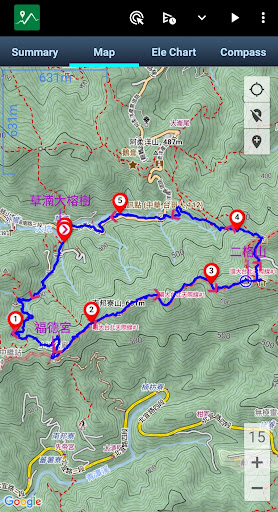
The core function of Green Tracks reads and analyzes the GPX, KML, KMZ and other track files in the mobile phone, and draws the analyzed content on the map.
With the GPS satellite positioning, the user can know where he is in the track line.
Reduce the risk of getting lost and can be used as a reference for outdoor activities such as mountain climbing and hiking.•Supports Mapsforge offline map filesYou can download the OpenAndroMaps world map directly in Green Tracks.•Offline searchInstall Mapsforges POI file to search for points of interest offline.•Supports offline maps in MBTiles formatUsers can use Mobile Atlas Creator (MOBAC) to create MBTiles offline maps and select the MBTiles SQLite format.
For offline map production methods, please refer to https://sky.greentracks.app/?p=2895•Online mapYou can use Google Road Map, Google Satellite Map, Google Hybrid Map, Google Terrain Map.•Record tracksUse Green Tracks to record your own journey.
The recorded track lines can also be edited or merged, and the records can be saved in file formats such as GPX, KML or KMZ through the export function.•Supports various types of track file formatsGreen Tracks can parse track files in GPX, KML, KMZ and other file formats and display them on the map.•Route planningSupports BRouter, you can plan routes in Green Tracks and export them as GPX, KML or KMZ.•Automatically return coordinatesBy automatically returning coordinates or manually returning coordinates (network signal is required), those left behind can keep track of the traces at any time.•Mark locationThe coordinates reported by family members or friends can be marked on the map automatically or manually, making it easier to track their whereabouts.•Coordinate conversionWGS84 coordinate format conversion and TWD67, TWD97, UTM and other geodetic datum conversions.•Off-track AlarmDuring the process of recording the track, combined with the GPX file, you can use this function to avoid taking the wrong path.•Backup and restoreBackup and restore self-recorded track records.•Support HGT filesThe HGT elevation file can be used to correct the altitude and improve the accuracy of the altitude.•Photo mapScan the photos on your phone and display them on the map to recall all the memories you took when you took them.•Share your tracksYou can share your GPX records with other users, or download GPX files for tracking.• ScreenshotTake screenshots of the "Summary", "Map" and "Ele Chart" of the walking track and collage them into one photo for easy sharing on various online platforms.•Supports overlapping mapsGreen Tracks supports offline maps stacked on top of online maps, and offline maps stacked on top of offline maps.•Supports Google Earth tour filesThe records of the Green Tracks can be exported to kml or kmz files and provided with Google Earth Pro version (PC version) to record dynamic track videos.
Video referencehttps://youtu.be/f-qHKSfzY9U?si=MO7eQQVSHEyZ57DKOur websitehttps://en.greentracks.app/
https://andro.io/app/tracks-1o1m5
 Power 100

Android app profile
Green Tracks - hiking partner for Android – Latest Version & Features
by Sky Wang
★★★★★
(0 ratings)
Rate this app
How do you feel about Green Tracks - hiking partner?
Thanks for your feedback!
> 2.2k
Monthly Downloads
~$900
Estimated Cost
Screenshots









