
Font!
Lightbox tracing app is an integrated tracing app for drawing and illustrating fonts.
This app is meant to be used with a physical paper for stencilling and drawing.
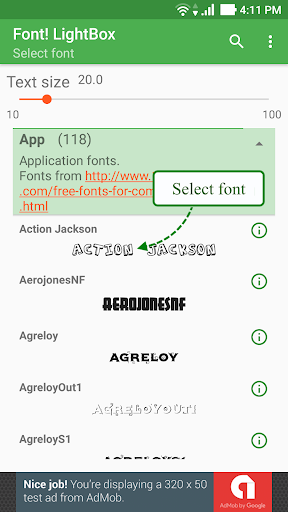
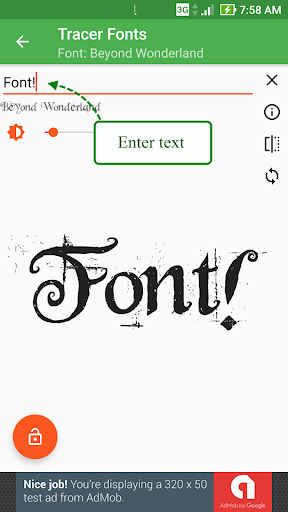
you just need to select a template font, enter your custom text, then place a tracing paper over it and begin tracing.The default app is a white screen with a brightness control setting.
Place your reference font over the device and begin tracing.
Great for making stencils, sketchbook crafts, connect-the-dots puzzles, tattoo transfers, etc.
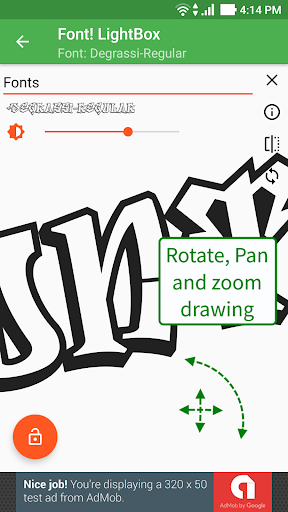
There is a lock button which will maximize the drawing space, and prevent the device from sleeping.
Its really great for making stencils and to practice drawing fonts with.Features include: -- use your custom ttf and otf files.- pan, rotate, zoom the text references.
- button to toggle rotate on and off.The app is suitable for artists, students, and parents as well as casual users of all ages to do art and craft.There is a wide range of uses for Tracer!
app including: -- traditional cell art animation and tracing- calligraphy and font tracing (e.g.
to transfer calligraphic fonts and swirl patterns onto posters and paintings)- making stencils (e.g.
for Halloween pumpkin carving; graffiti and spray painting art; Christmas snow stencils; cake decorating stencils)- making tattoo transfers - outline tracing (e.g.
for colouring activity sheets; making connect-the-dots puzzles; practise writing letters and numbers)
https://andro.io/app/tracerfonts
 Power 100

Android app profile
Font! Lightbox tracing app for Android – Latest Version & Features
by Angel Koh
★★★★★
(0 ratings)
Rate this app
How do you feel about Font! Lightbox tracing app?
Thanks for your feedback!
> 2.2k
Monthly Downloads
~$900
Estimated Cost
Screenshots




