
The best lock screen application, to help you protect your privacy, prevent others trying to access your phone illegally.This lock screen app has a beautiful lock screen with multiple themes.NEW FEATURES
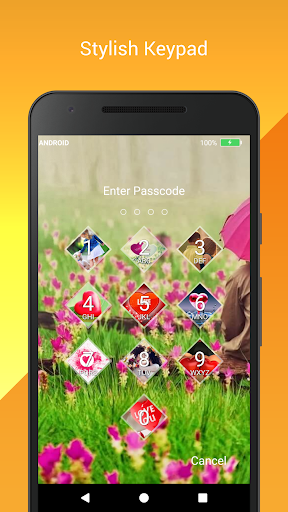
★ Cool iPhone style lock screen for your android.
★ Support on most of android phone.
★ Fully customisable lock screen.
★ Highly secure lock screen.
★ One of the best parallax effect Lock.
★ Customise sliding text.
You can put your name or your friends name on your lock screen.Features
✔ Customise wallpaper for lock screenYou can apply HD Screen wallpaper or choose from Gallery.
✔ Unlock sound enable/disable.
✔ Unlock vibration enable/disable.
✔ 12 hour and 24 hour format both supported.
✔ Consume less memory and battery, Simple and Clean device.
✔ 100% safe and secure Love Screen Lock- Time Password
✔ Choose your own lock typeYou can choose your own way to lock your android phone(Passcode change dynamically).► Current Time : It is default password of your lock screen.
e.g.
If the time is 01:47, your PIN will be 0147.
► Pin Passcode - User can choose any password.► Pin + Minute Passcode - e.g.
if you choose digit is 12 and the time is 01:45 your PIN will be 1245.► Pin + Current Time Passcode - e.g.
if your choose digit is 45 and the time is 02:37 your PIN will be 450237.► Pin + Day Passcode - e.g.
if your choose digit is 45 and the date is 4 July 2017 your PIN will be 450407.► Pin + Hour Passcode - e.g.
if you choose digit is 12 and the time is 01:45 your PIN will be 4501.---FAQ---
★How to open hidden Love Screen Lock - Time Password?
1.
Enter #666#6 in dial pad, and tap call button.
★ How to lock Xiaomi / MI phones?►Xiaomi / MI phones have different permission management style.
To use Screen Lock - Time Password on Xiaomi / MI phones, please follow the following steps.1.
Open Security App -> permissions.Choose option permissions -> Love Screen Lock - Time Password -> Allow all the permissions.2.
Go back to Permissions -> Auto Start -> Allow Love Screen Lock - Time Password to Auto Start.
★ Explanation for the permissions:android.permission.INTERNET android.permission.READ_PHONE_STATEandroid.premission.ACCESS_NETWORK_STATEAD company need read phone state and network state to display and improve there AD quality.
android.permission.SYSTEM_ALERT_WINDOW : to lock screenandroid.permission.RECEIVE_BOOT_COMPLETED : To lock device as soon as it restartsandroid.permission.CAMERA : Image capture for lock screen wallpaperandroid.permission.READ_EXTERNAL_STORAGE : For change lock screen wallpaperandroid.permission.PROCESS_OUTGOING_CALLS : For open lock screenLove Screen Lock - Time Password will not collect your any information.
https://andro.io/app/timepasswrod



Android app profile
Love Screen Lock-Time Password for Android – Latest Version & Features
by Adria Devs
Power 100
Rate this app
How do you feel about Love Screen Lock-Time Password?
Thanks for your feedback!
> 2.2k
Monthly Downloads
~$900
Estimated Cost
Screenshots




