
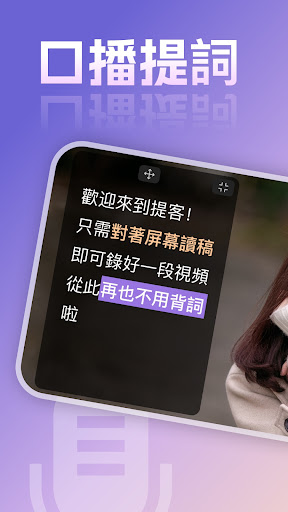
The teleprompter is a teleprompter tool that allows you to say goodbye to forgotten words, speak eloquently in one shot, and improve creative efficiency dozens of times.The teleprompter is very suitable for up owners who usually need to record oral broadcasts, live broadcasts, online classes, vlog shooting, video interviews, video speeches, video conferences, etc., just paste the manuscript into the teleprompter app, and it will automatically Rolling playback keeps you calm and calm while you speak.
Dont forget the words and love the prompts, no need to memorize the lines anymore.
Ad-free teleprompter master, the lines follow the speed of speech, allowing you to easily record short videos.Features of the teleprompter:1.
Professional and easy to use!
Easily master the tips of recording and broadcasting video.2.
The pure version has no advertisements!
There is no need to memorize scripts, the teleprompter on mobile phones can solve all line problems.3.
Mobile phone scrolling subtitles, a must-have vlog artifact for creators, and the recording efficiency is increased by 10 times.4.
Provide a large library of beautiful poetry!
It allows you to utter golden sentences frequently during the live broadcast.5.
Professional teleprompter for lines, no fear of forgetting words when recording real people, and read the teleprompter more naturally.6.
Flexible and powerful teleprompter panel settings, all support customization7.
The floating inscription function allows you to take pictures easily[AccessibilityService API Permission Description]Accessibility service: We use this service to facilitate your use of the application floating window function.
Before using this service, a pop-up window will prompt you whether you want to enable the accessibility assistance permission.
If you agree, you can click "Open Accessibility Tools", the application will go to the accessibility permission setting page, if you do not agree, you can click "Do not open".If you want to turn off this permission after enabling it, you can turn off the accessibility assistance tool in [Settings] > [Shortcuts and Assistance] > [Accessibility] > [Teleprompter].We can use this service only after your active authorization, and we promise not to collect any information from you.
https://andro.io/app/tik-1iuir
 Power 100


Android app profile
提詞器-提客懸浮提詞器口播字幕提詞器 for Android – Latest Version & Features
★★★★★
(0 ratings)
Rate this app
How do you feel about 提詞器-提客懸浮提詞器口播字幕提詞器?
Thanks for your feedback!
> 2.2k
Monthly Downloads
~$900
Estimated Cost
Screenshots









