
■ How to use1.
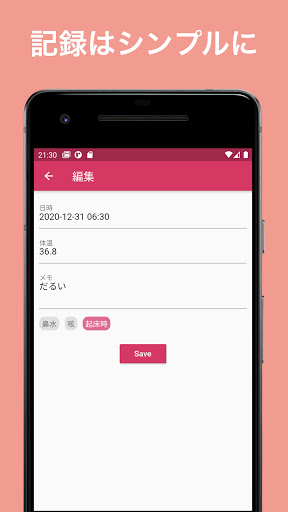
Record body temperatureSpecify the date and time and body temperature on the recording tab.You can also record your physical condition in a memo.2.
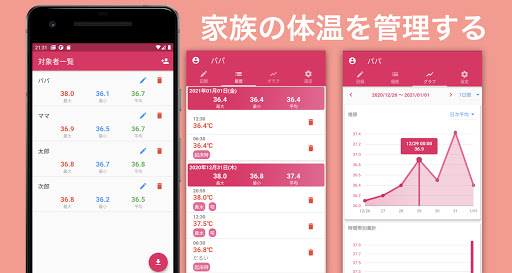
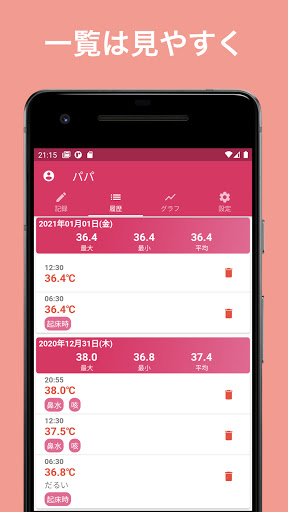
Check body temperature historyYou can check the recording result on the history tab.If you are recording multiple times on the same day, the maximum, minimum, and average will also be displayed.3.
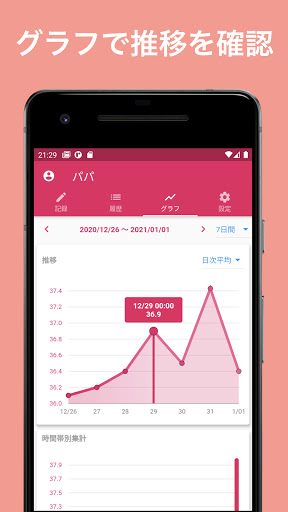
Graph displayYou can display the transition of body temperature as a graph on the graph tab.The graph period can be selected from 7 days, 30 days, and 90 days.4.
Switching / adding the target personTap the person icon on the toolbar to display the target person list, and you can switch, add, or delete the target person.You can also check the maximum, minimum, and average body temperature of all the subjects.5.
Tag managementYou can edit the tag from the settings tab.You will be able to select a tag as information when recording body temperature.
https://andro.io/app/temperture-manager
 Power 100
Android app profile
シンプル体温管理-簡単に体温を記録するアプリ for Android – Latest Version & Features
by snolle.com
★★★★★
(0 ratings)
Rate this app
How do you feel about シンプル体温管理-簡単に体温を記録するアプリ?
Thanks for your feedback!
> 2.2k
Monthly Downloads
~$900
Estimated Cost
Screenshots









