
Create Polls and Surveys quickly and easily.
SurveyMonster offers variety of templates and many features, making it one of the Best Poll App.
Share polls and surveys on WhatsApp, Telegram, Facebook and other social media including Instagram and Twitter.
Also share on Email, SMS, iMessage and forum.
You can even stop your live poll whenever you want.
This polling app is a best poll app to create Polls on WhatsApp, Quizzes, Questionnaire, Social Voting app, Politics Poll, Casual Voting, Audit Surveys, Customer Rating and Feedback Survey.
👉 Three simple steps to publish a poll:
📝 CREATE A POLLType the question and its answer options to vote.
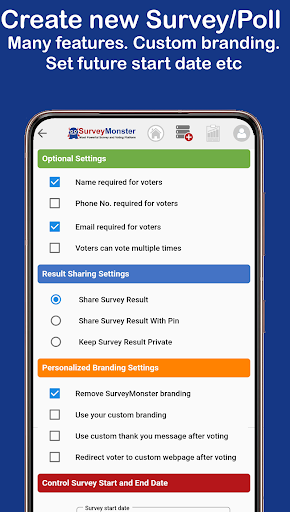
Set the different settings like allow single vote or multiple votes, share results with friends, Survey start and close date etc.
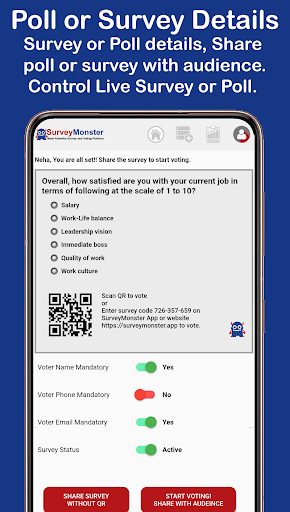
🔗 SHARE WITH YOUR AUDIENCEShare your survey or poll with your users on WhatsApp and social media at a click of button for Voting.
🏁 START VOTING!Voters can easily vote by going to the link of the question and selecting an answer.
Or simply by scanning the surveys QR code.
📊 SURVEY RESULTSInteract and analyze your audiences surveys results in real-time.
Review polls results and audiences choice using bar chart, donut charts, vote count and data analytics etc.
Export survey or polls voting data into .CSV file.
https://andro.io/app/surveymonster
 Power 100


Android app profile
SurveyMonster: Create Polls for Android – Latest Version & Features
★★★★★
(0 ratings)
Rate this app
How do you feel about SurveyMonster: Create Polls?
Thanks for your feedback!
> 2.2k
Monthly Downloads
~$900
Estimated Cost
Screenshots









