
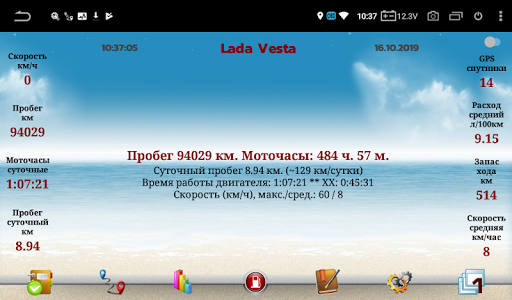
The program "ServiceNote" is intended for installation on MMS with Android OS in carsMain functions:- automatic calculation of the distance traveled by the car according to the average daily mileage or GPS (optional)- automatic calculation of hours.- alternative calculation of hours if the main one does not work- display information about expired events- display information about upcoming events for a certain time- notification panel with mileage indication- record of events by mileage- recording events by time- recording of events by hours- maintaining a log of completed work- event reminder every half hour- 3 separately customizable multifunctional widgets- maintaining cyclic tasks- after installation, you need to add the program to the "white" list, in the MMS settings.- autoload- travel statistics.
Mileage per day, total travel time per day, maximum speed per day.
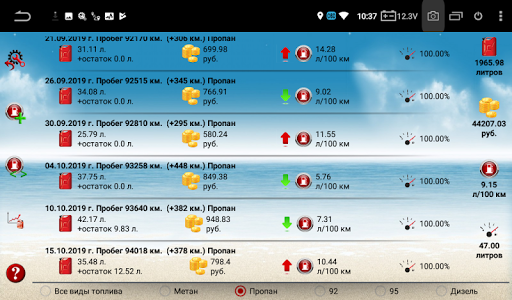
Display statistics by day- display on the pop-up window of data on mileage and engine hours, up to 60 km / h - every kilometer, from 60 to 100 km / h - every 10 km, more than 100 km / h - every 20 km- record data on gas stations, for 5 types of fuel (92, 95, methane, propane, diesel), display information on gas stations- display the average flow rate on the main screen- start the program by clicking on the curtain from the status bar- remembers the last fuel and cost- the ability to display gas stations for the current month- variable correction coefficient to mileage- display on the main screen of fuel consumption per day and the cost of travel per day- calculation of the average daily mileage based on travel statistics- added graphs of average mileage from mileage and mileage graph from date- automatic switching of the calculation method of the hour, from the on-board voltage or from the GPS sensor- Automatic daily backup of all databases.
Indication of a successful reservation.
At the bottom left is a red (unsuccessful) or green (successfully) icon- saving the progress report on Google Drive- the ability to adjust the total mileage when entering refueling data- backup of the database when entering new data, except for trip statistics- notification of scheduled events in the curtain- automatic mileage correction when GPS signal is lost (for example, tunnel passage).
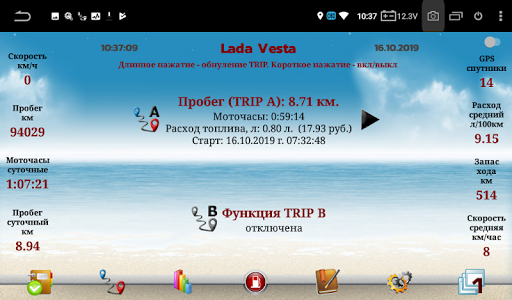
Not tested!- various icons in the magazine for different types of work- calculation of the average speed every day- Added information on the amount of fuel in the tank, for 1 or 2 types of fuel, warning about low fuel level- TRIP function (similar to automotive).
Mileage calculation is possible with or without correction factor- notification in the status bar about the absence of a GPS signal- notification in the curtain about the number of GPS satellites- display of speed on the main screen (disabled)- the ability to set your background image.
To do this, in the / sdcard / ServiceNote_backup folder, you need to copy the image with the name Mainback.jpg (name with a capital letter).
For the image to change, close the program through the "Tasks" button, and run it again- setting your text color- day and night mode- support for Vesta cars with CanBus3 device, which allows you to automatically update mileage- many other features
https://andro.io/app/sqlauto3
 Power 100

Android app profile
ServiceNote for Android – Latest Version & Features
by Самусенко Артём
★★★★★
(0 ratings)
Rate this app
How do you feel about ServiceNote?
Thanks for your feedback!
> 2.2k
Monthly Downloads
~$900
Estimated Cost
Screenshots









