
Smutify lets you enjoy a smooth silence instead of Spotify ads.
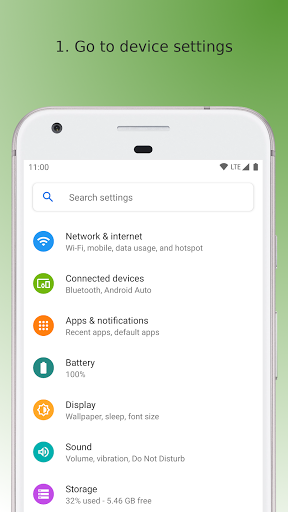
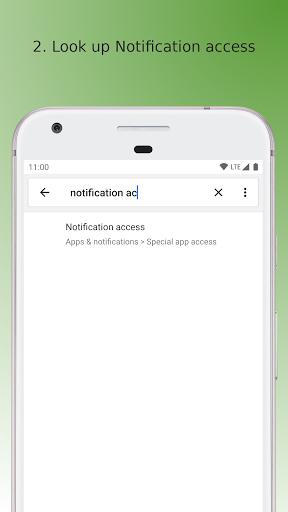
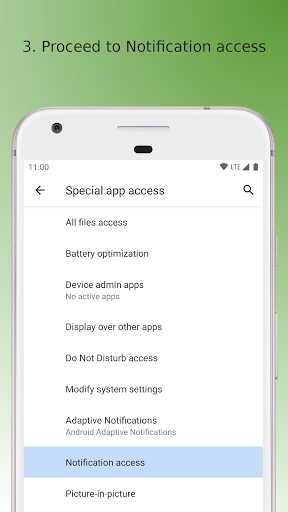
Dont forget to set it up as explained in the screenshots or in the description below.• Getting startedSmutify requires notification access in order to function.
Go to settings on your device.
Look up "Notification access".
You will see a list of apps which may use the access.
Enable Smutify.
Thats it, you are guarded from the ads now.• I installed Smutify, why cant I find it in my apps?Smutify does not appear in the apps because it has no reason to.
The apps sole purpose is to mute ads - no settings, no unnecessary complexity is bundled within.
Think of this behavior as in: Smutify does not pollute your app area with noise.
This is also the reason the app can be so tiny and lightweight.
Smutify can still be found under Settings > Apps area.• How does Smutify work?Each time Spotify creates or changes a notification, Smutify has a quick look over it.
If the notification indicates an ad is being played, the audio is muted for its duration.• Im worried about privacySmutify uses no internet connectivity at all.
You can confirm this in: Settings > Apps > Smutify.
Moreover, internet access for the app can be entirely disabled in the same settings location.
https://andro.io/app/spotifyslayer
 Power 100

Android app profile
Smutify for Android – Latest Version & Features
by s8dev
★★★★★
(0 ratings)
Rate this app
How do you feel about Smutify?
Thanks for your feedback!
> 2.2k
Monthly Downloads
~$900
Estimated Cost
Screenshots









