
-Learn to listen and learn to speak !-This app makes use of speech-to-text(voice-to-text) and text-to-speech(text-to-voice) technology for proper pronunciation.-This app is very easy to use.
Just install it, following the guidelines step by step.-Supported speech recognition 119 languages.-You do not need to change the settings of your default Google Voice Input device and the TTS engine.
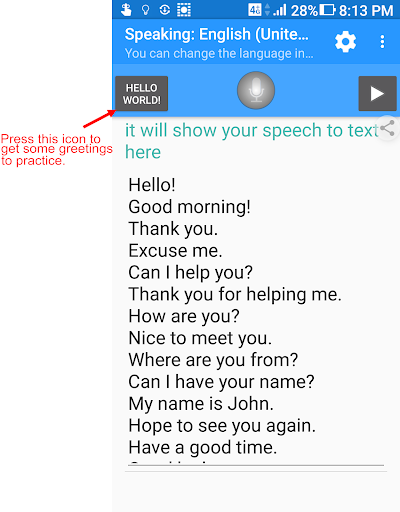
We do all this for you!-You need only put some sentences in the language, which youre just learning.
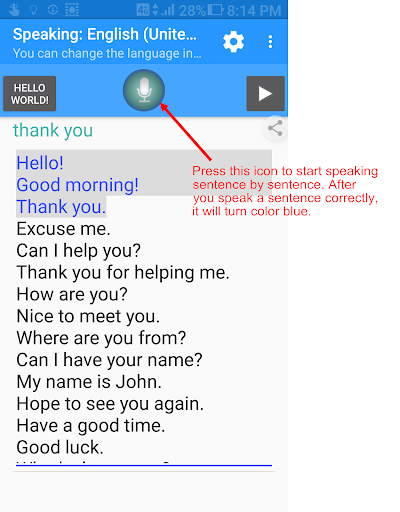
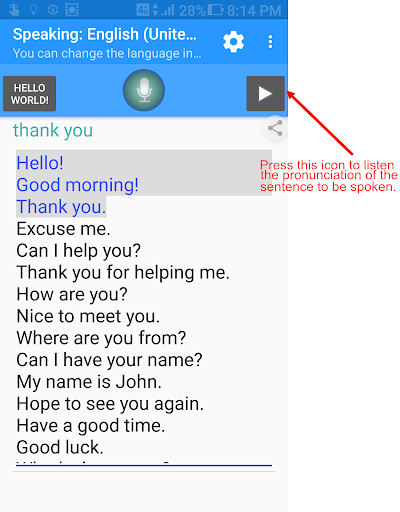
Click the play button to listen or click the microphone button to speak.
This app will verify your speaking and guide you sentence by sentence.-This app needs a Speech-To-Text recognizer and a Text-To-Speech engine for your languages learning.
You can follow, after first launch, our instructions to setup them.Requirements:- "Google Speech Recognition & Synthesis" or "Google voice search (Google App)" is required as a speech to text engine.
Its used as a voice input or voice typing method.
Most devices have it pre-installed.
If your devices do not install it, This app will guide you to install.https://play.google.com/store/apps/details?id=com.google.android.ttshttps://play.google.com/store/apps/details?id=com.google.android.googlequicksearchbox
https://andro.io/app/speaking-1ti0p
 Power 100

Android app profile
Languages pronunciation for Android – Latest Version & Features
★★★★★
(0 ratings)
Rate this app
How do you feel about Languages pronunciation?
Thanks for your feedback!
> 2.2k
Monthly Downloads
~$900
Estimated Cost
Screenshots









