
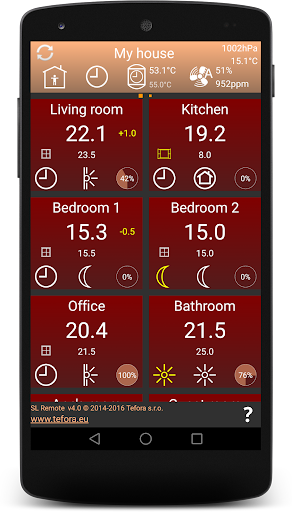
SL Remote helps you efficiently and intuitively control heating, cooling and switching groups in your Siemens Synco living home automation.It displays clear overview of all Synco living rooms as tiles on a single screen.
Switching groups are displayed to the right of the rooms, on the same or a separate screen.
Scene switching groups are not yet supported.
Just tap a room tile to change its cooling/heating, the apartment tile for the whole house or a switching group action to activate it.Free version has limitations compared to the Full version:1.
You can control the whole apartment, the first room and the first switching group, but only view the others.2.
You cannot connect to your Synco living via Siemens Synco IC access portal.3.
You cannot select one of several central units connected to the same webserverFind the Free version on https://play.google.com/store/apps/details?id=eu.tefora.slremotefreeFind the Full version on https://play.google.com/store/apps/details?id=eu.tefora.slremotefullTechnical informationSL Remote connects to Synco living using https protocol (unsecured http is not permitted) via Siemens OZW772 webserver.
In case your OZW772 is accessible via internet or you use Siemens Synco IC portal, you can control your Synco living remotely - before returning home from travel etc.During the first connection, SL Remote preloads all necessary data, so that subsequent use of the app is much faster.SL Remote accesses the first central unit (QAX910 w.
firmware version >= 3.0 or QAX913 or QAX903) connected to your OZW772.
In case you have more than one server unit, you can specify the name or KNX ID of the central unit to be accessed.In order to connect SL Remote to your OZW772, create a new connection profile and specify:- profile name- IP address or domain name of OZW772 and optionally a TCP port number (such as 192.168.1.100 or https://myserver.mydomain:12121)- (optionally) the name or KNX ID of the central unit to be accessed- User name defined in OZW772- User password defined in OZW772In order to connect SL Remote to your OZW772 via Siemens Synco IC connection portal:- check option Use connection over the portal?- specify user name and password of your portal accountSee help inside the application for more details.
https://andro.io/app/slremotefree
 Power 100



Android app profile
SL Remote Basic for Android – Latest Version & Features
★★★★★
(0 ratings)
Rate this app
How do you feel about SL Remote Basic?
Thanks for your feedback!
> 2.2k
Monthly Downloads
~$900
Estimated Cost
Screenshots









