
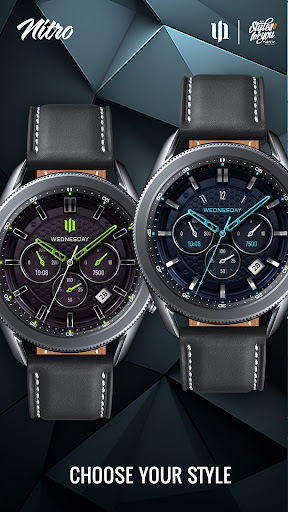
Upgrade your Wear OS experience with the S4U Nitro.
A realistic classic watch face with lots of customizable options and 2 custom complications.Highlights:- realistic classic watch face- color customization (gold, silver, blue, green, purple and more)- 2 custom complications (for custom data)- 4 custom shortcuts to reach your favourite widget- watch face shows the time, steps, heart rate, weekday and the day of the month.***IMPORTANT!This is a Wear OS Watch Face app.
Its supporting only smartwatch devices which are running with WEAR OS API 30+.
For example: Samsung Galaxy Watch 4, Samsung Galaxy Watch 5, Samsung Galaxy Watch 6 and some more.Problems with the installation even with a compatible smartwatch?Visit: http://www.s4u-watches.com/faqor contact me: [email protected]***AOD:The watch face have a always on display.Colors are synchronized with the normal view.Keep in mind, when you using the always on display it will reduce your battery endurance!Color adjustments:1.
Press and hold finger on the watch display.2.
Press the button to adjust.3.
Swipe left or right to switch between the different customizable items.4.
Swipe up or down to change the options/color of the items.Available customization options:Color: 10 (hands, logo, details)Background colors: 7Index colors: 10Index secondary colors: 10Ring colors: 10Logo style: 5Index glow: on or offAOD brightness: 3 levelAdditional functionality:+ tap the battery indicator to open battery details (not supported by every smartwatch)Heart rate measurement (Version 1.0.4):The heart rate measurement has been changed.
(Previously manual, now automatic).
Set the measurement interval in the watchs health settings (Watch Setting > Health).****Setting up app shortcuts and custom complications:1.
Press and hold the watch display.2.
Push the customize button.3.
Swipe from right to left until you reach the "complications".4.
5 app shortcuts and 2 custom complications are highlighted.
Click on them to make the desired settings.Thats it.
If you like the design, it is definitely worth to have a look at my other creations.
More designs will be available for Wear OS in the future.
Just check out my website: https://www.s4u-watches.com.For quick contact with me, use the email.
I also would be happy for every feedback in the play store.
What you like, what you dont like or any suggestions for the future.
I try to have everything in view.
My Social Media to be always up to date:Instagram: https://www.instagram.com/matze_styles4you/Meta: https://www.facebook.com/styles4youYouTube: https://www.youtube.com/c/styles4you-watchesX (Twitter): https://twitter.com/MStyles4you
https://andro.io/app/s4unitro
 Power 100



Android app profile
S4U Nitro - Classic watch face for Android – Latest Version & Features
by styles4you
★★★★★
(0 ratings)
Rate this app
How do you feel about S4U Nitro - Classic watch face?
Thanks for your feedback!
> 2.2k
Monthly Downloads
~$900
Estimated Cost
Screenshots









