
Reliable in case of emergency!
You can request a road service to trouble spots smoothly with the GPS function.Please agree to the app terms and download beforehandClick here for terms and conditions (https://www.timesclub.jp/sp/about/roadservice_app_terms.html)[Features of this application]■ Easy setting of trouble locationト ラ ブ ル Use the GPS function to easily set the trouble location.■ Request a road serviceロ ー ド You can request a load service directly from the app just by selecting the content of the trouble (*).(*) Depending on the content of your request, we may call you for confirmation after your request is completed.■ Display progress進 捗 You can check the progress such as estimated arrival time in the app.【FAQ】■ Can I use it for non-Times Road service members?ア プ リ Apps can be used by anyone other than Times Road Service members.■ Is there a charge for requesting a road service?Times Road Service members are free of charge (however, some work may be charged).方 If you are not a Times Road Service member, you will be charged and a fee will be charged according to your work.■ Is personal information entered on the app sent to Times Communication?情報 Because the entered information is saved in the app, unless you send (request for dispatch)Times Communication will not browse.■ Can I take over my registered personal information when changing models?た め The data cannot be transferred because it is registered for each downloaded application.登録 Sorry to trouble you, but please register again when changing the model.[Notes on use]The app may not work properly on some devices due to device-specific functions, screen size and resolution effects.
Please note.■ I want to improve the accuracy of location informationWi-Fi (wireless network) and GPS function must be enabled.If you enable the GPS function, you can get more accurate location information.■ A map of a place that is not your current location is displayed押 し Press the current location icon on the location information setting screen.再 Reacquire the location information of the current location.■ The current location displayed on the map is shifted精度 The accuracy of the current location information (GPS / network base station)異 な り Varies depending on the condition of receiving radio waves from satellites and the environment of use.で は In places where there are tall buildings indoors or around,The display may take a long time or an error may occur.Please consider that approximate location information is displayed on the map.[About permissions used by the app]■ Full access to networkLoad service Use to obtain dispatch request information.■ Accurate location information (GPS and network base stations)取得 Get the current location from GPS and Wi-Fi (wireless network) location information,使用 Used to display on the map.■ StorageUsed to save Google Maps cache data.■ Read Google service settingsUse to use Google Maps.
https://andro.io/app/rsr4trapps
 Power 100
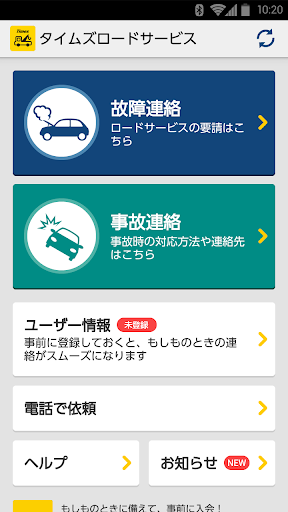


Android app profile
タイムズロードサービス ロードサービス出動依頼 for Android – Latest Version & Features
★★★★★
(0 ratings)
Rate this app
How do you feel about タイムズロードサービス ロードサービス出動依頼?
Thanks for your feedback!
> 2.2k
Monthly Downloads
~$900
Estimated Cost
Screenshots









