
RS_player is a player able to play radio channels from all around the world organised on www.iptv-updated.com.
The radios can be easily updated through the APP or within the website www.iptv-updated.commore description of the RS_player is here described:https://www.iptv-updated.com/rs_player-guide/With a personal account on the website www.iptv-updated.com, users can search, add and organize streaming radios for free.
One channel can have multiple links and an indicator to help to remember if the link is working or not.
RS_player is easy to use: from the "radios" tab, you can select from a menu list, the preferred country group and after you can easily listen one of the radio by clicking the button play associated.
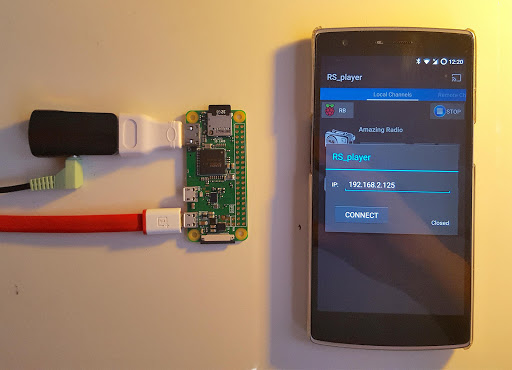
The radio with the selected link can be added in the favorite tab.The radios can be sent to Chromecast (audio and video):details is described in this link:https://www.electronics-engineering.com/how-to-stream-radios-m3u-pls-on-chromecast-audioor to a Raspberry PI properly configured: setup is described in this link:https://www.electronics-engineering.com/transform-raspberry-pi-to-cast-audio-with-a-interactive-android-app
https://andro.io/app/rs-player
 Power 100



Android app profile
RS player: organised radios for Android – Latest Version & Features
★★★★★
(0 ratings)
Rate this app
How do you feel about RS player: organised radios?
Thanks for your feedback!
> 2.2k
Monthly Downloads
~$900
Estimated Cost
Screenshots









