
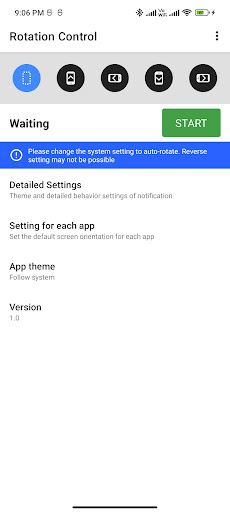
Rotation - Screen Orientation Manager application use to set mobile screen in a specific orientation (portrait / landscape) or rotates mobile screen according to the sensor.You can change the mobile screen orientation from the notification area.
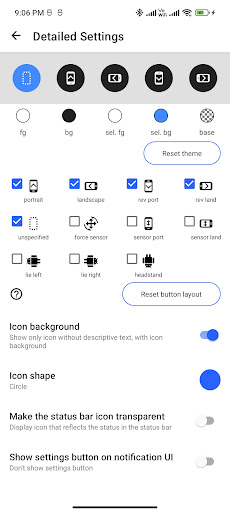
Rotation - Screen Orientation Manager is also possible to associate a specific application with the screen orientation and change settings when the application starts.In Rotation - Screen Orientation Manager not all settings are available because some mobile screen orientations are not supported by some devices.Because Rotation - Screen Orientation Manager app forcibly changes the display of the running application, it can become inoperable or, in the worst case, cause a crash.Please use at your own risk.The following settings are possibleunspecified- Unspecified orientation from this app.
Device will be the original orientation of the displayed appforce sensor- Rotate based on sensor informationportrait- Set device screen to portraitlandscape- Set device screen to landscaperev port- Set device screen to reverse portraitrev land- Set device screen to reverse landscapesensor port- Set device screen to portrait, automatically flip upside down by sensorsensor land- Set device screen to landscape, automatically flip upside down by sensorlie left- Rotate it 90 degrees to the left with respect to the sensor.
If you lie on left lateral and use it, the top and bottom will match.lie right- Rotate it 90 degrees to the right with respect to the sensor.
If you lie on right lateral and use it, the top and bottom will match.headstand- Rotate 180 degrees with respect to the sensor.
If you use this by headstand, the top and bottom will match.Trouble shooting- If you can not fix in the opposite direction of the portrait / landscape, try changing the system setting to auto-rotate
https://andro.io/app/rotationcontrol-pi98
 Power 100

Android app profile
Rotation Control - Oriantetion for Android – Latest Version & Features
by Brain Tools
★★★★★
(0 ratings)
Rate this app
How do you feel about Rotation Control - Oriantetion?
Thanks for your feedback!
> 2.2k
Monthly Downloads
~$900
Estimated Cost
Screenshots









