
Remote Release allows you to "remote release" your Canon EOS DSLR from your Android device with only a USB cable.
Wi-Fi support is also present, if your camera supports Wi-Fi or you are using a go-between like the MR3040 - see further details on the DSLR Controller website ( http://dslrcontroller.com/ ) on how to setup the Wi-Fi connection.*** PLEASE READ THE ENTIRE DESCRIPTION ****** IF YOUR DEVICE IS NOT COMPATIBLE THIS IS NOT MY OR THE SOFTWARES FAULT - YOUR PHONE IS MISSING NEEDED SOFTWARE OR HARDWARE !
***Remote releasing is using a remote control to activate the shutter of the camera.
This is to prevent shaking the camera, and is often used with bulb shots and/or tripods.This app is the little (free) brother of DSLR Controller; see http://dslrcontroller.com/ and https://play.google.com/store/apps/details?id=eu.chainfire.dslrcontroller Remote Release also has a discussion thread on XDA-Developers.com: http://forum.xda-developers.com/showthread.php?t=1369684---- Features ----- Activate the cameras shutter button from your phone over USB, just like using a remote release cable- Enable/Disable Auto-Focus *- Support for bulb shots (hold shutter button) *- Support for continuous shooting (hold shutter button) ** Depends on camera model.
Requires a DryOS based camera.
See DSLR Controllers device compatibility page ( http://dslrcontroller.com/devices.php )---- Requirements ----- An Android device with an ARMv7-A or newer CPU architecture (virtually all 1ghz+ devices)- Supported Canon EOS DSLRWhen connecting over USB:- Not rooted: Android 3.1 or higher with USB host kernel+API support **- Rooted: Android 2.3.1 or higher with USB host kernel support **- The correct USB adapter, if applicable** USB host kernel support can usually be determined by connecting a USB stick to your device, and seeing if the device recognizes it.---- Devices ----Please see DSLR Controllers supported devices page ( http://dslrcontroller.com/devices.php ) for device compatibility information.----- Usage ------- Getting started --- Install the application.- Connect your camera to the phone/tablet, and turn it on.
Half-press the shutter button if it was already on.- If a popup comes up that offers to open Remote Release, press it, and move on to "Operation" below.- If a popup does not come up, manually start Remote Release.
A Superuser popup should appear, click allow.
If this took more than a few seconds, Remote Release will complain it cannot find a camera, regardless if you have one connected or not.
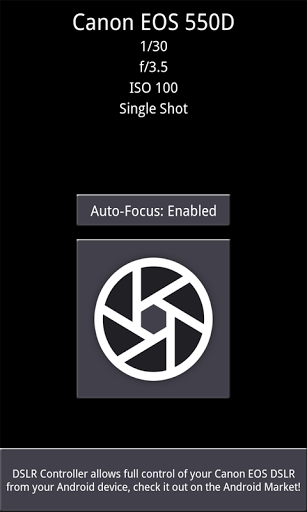
Exit the app, half-press the shutter button on the camera, then restart the app.- If a popup appears that tells you your device is not compatible, this is the end of the line for you.-- Operation --After you have connected your camera and started the app, the app will show you the following:- Camera model- Current shutter setting (depending on camera mode)- Current aperture setting (depending on camera mode)- Current ISO setting (depending on camera mode)- Current drive mode settingBelow that you will see three buttons:- Auto-Focus button- Shutter button- Button to open DSLR Controller in the MarketIf your lens is set to Auto-Focus and you are using a DryOS based camera, you can use the Auto-Focus button to select if focusing is triggered by pressing the shutter button.
By default it is, but it is not always desired.
If your lens is set to Manual-Focus, this setting has no effect.Pressing the shutter button will take a picture on your camera.
If the camera is set to bulb mode or to continuous shooting, press-and-hold the shutter button - the bulb/continuous capture will stop once you remove your finger from the screen.
https://andro.io/app/remoterelease
 Power 100

Android app profile
Remote Release for Android – Latest Version & Features
by Chainfire
★★★★★
(0 ratings)
Rate this app
How do you feel about Remote Release?
Thanks for your feedback!
> 2.2k
Monthly Downloads
~$900
Estimated Cost
Screenshots









