
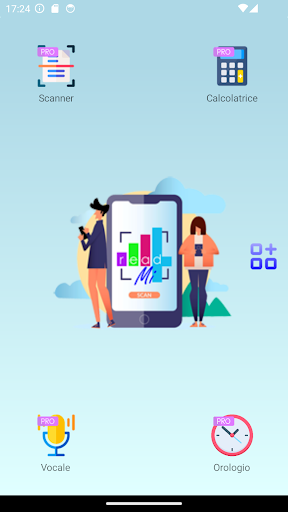
Read4Mi is the App designed for people suffering from Severe or Visually Impaired Dyslexia, Dyscalculia, Dysgraphia or Dysortography who need help in reading signs, documents, booklets or in carrying out calculations, reading the time or dictating and transcribing notes!Read4Mi includes the following features:PRO- Advanced scanner of printed texts.
Frame the document and Read4Mi will guide you to obtain the best result through a specially created algorithm;- Numeric and Euro speaking calculator.
It performs simple calculations and reads the result, specifying how to write it, number by number.
Performs additions and subtractions with Euro cents;- Talking clock.
Animated clock that shows the passing of the hours, indicates the time on a hand and analogue dial and reads the date and time;- Voice dictation.
It allows you to dictate texts, transcribe them and listen to them again.PREMIUM- Android integration and sharing.
Adds "Read with Read4Mi" integration to pdf documents, images and texts.
It allows you to share the dictated and transcribed text;- Advanced PDF reader.
It allows you to import any PDF file containing text and read it by highlighting the sentence read, to allow you to follow more easily.
It allows you to save the point you arrived at and start from there the next time;- Multipage scanning.
It allows you to scan multi-page documents or entire books, save them in the library and read them later;- Advanced resizing.
Allows you to crop, rotate and resize an image from library or camera before reading it.
Useful in case of particular shaped images that the scanner cannot read correctly;- Read handwritten notes.
Reads handwritten notes in both cursive and block letters;- Read free text or entire websites.
Copy any text to the clipboard and Read4Mi will read it for you.
Type a web address to read the entire site;- Conceptual maps.
Select a text and copy it as an element of a Concept Map.
Add Annotations, Shapes, Titles and export them as image or pdf.Read4Mi contains two interfaces: Smart, particularly suitable for children or people suffering from Severe Dyslexia, and Advanced, which allows you to exploit all the features of the App.Each feature contains visual and textual instructions that can be automatically read by the App.Both the PRO and PREMIUM features of Read4Mi can be tried for free 10 times, after which to continue using them, you will need to sign up for a subscription.Read4Mi exclusively provides compensatory support tools to people suffering from DSA and does not replace the specialized therapeutic/speech therapy path that may be necessary in your case.
If you suspect you have one or more DSA, contact your doctor or a psychologist, neuropsychologist or speech therapist to get the necessary support.
https://andro.io/app/read4mi
 Power 100



Android app profile
Read4Mi for Android – Latest Version & Features
★★★★★
(0 ratings)
Rate this app
How do you feel about Read4Mi?
Thanks for your feedback!
> 2.2k
Monthly Downloads
~$900
Estimated Cost
Screenshots









