
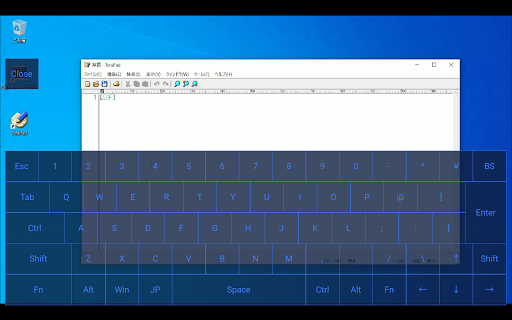
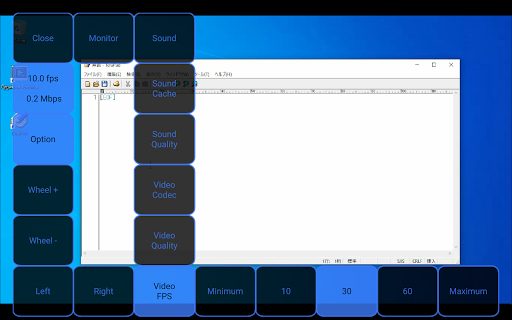
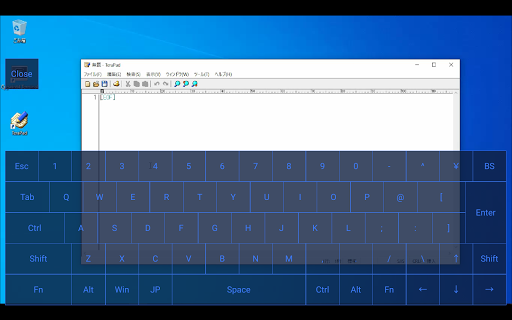
Qt Brynhildr is a remote desktop client app for operating your Windows PC from your Android device.[Operating environment]Brynhildr (Windows version) must be running on the operating Windows PC.Brynhildr can be downloaded from IchiGekis official website (http://blog.x-row.net/).Qt Brynhildr requires a WiFi environment for communication.The password length is limited to 16 bytes because it connects using the public mode published by Brynhildr.[Method of operation]================================================== ======================-------------------------------------------------- -------[Displaying connection dialog to server]-------------------------------------------------- -------[1 point double tap] Call the IP / host name of the server host that succeeded in connecting-------------------------------------------------- -------[Normal screen]-------------------------------------------------- -------=====================================[When using KeroRemote compatible operation type]=====================================[1 point tap (at full screen)] Move mouse cursor + left mouse button / click[1 point tap (when enlarged: within 0.5s)] Move mouse cursor + left mouse button / click[Pinch in] Desktop screen reduction[Pinch out] Enlarge desktop screen[Drag 1 point (at full screen)] Move mouse cursor + Left mouse button + Drag[Drag 1 point (when enlarged)] Scroll display area[3-point tap] Send Windows key=====================================[For Qt Brynhildr operation type]=====================================[1 point tap] Move mouse cursor + left mouse button / click[Pinch in] Desktop screen reduction[Pinch out] Enlarge desktop screen[Drag 1 point (at full screen)] Move mouse cursor[Drag 1 point (when enlarged)] Scroll display area[Tap 2 points] Right mouse button / click[3-point tap] Send Windows key-------------------------------------------------- -------[Software keyboard / button display]-------------------------------------------------- -------(1) When the touch panel interface is left / right type (initial value)[Drag from the outside of the left side of the screen toward the center (longer)] Software button display[Drag from the outside of the right side of the screen toward the center (longer)] Software keyboard display(2) When the touch panel interface is up / down type[Drag from the outside of the top edge of the screen toward the center (longer)] Software button display[Drag from outside the bottom of the screen toward the center (longer)] Software keyboard display-------------------------------------------------- -------[Displaying software / keyboard]-------------------------------------------------- -------[Close] Hide software keyboard[Shift / Ctrl / Alt / Fn] Tap to toggle between enable / disable[1 point tap (other than keyboard area)] Move mouse cursor-------------------------------------------------- -------[Software button is displayed]-------------------------------------------------- -------[Close] Hide software button[FPS / Data transfer amount] Information display only[Left] Left mouse button[Right] Right mouse button[Wheel +] Rotate the wheel up[Wheel-] Rotate the wheel down[Drag one point (area other than the button)] Relative movement of the mouse cursor[Option] Show / hide option buttons[Monitor] Select monitor[Sound] Sound ON / OFF[Sound Cache] Select cache level[Sound Quality] Sound quality selection[Video Codec] Video codec selection[Video Quality] Video quality selection[Video FPS] Select Video FPS================================================== ======================[Terms of service]・ We are not aware of any damage or damage caused during use.・ All rights, etc.
belong to the developer "Fun".・ This agreement is subject to change without notice.
https://andro.io/app/qtbrynhildr
 Power 100

Android app profile
Qt Brynhildr for Android – Latest Version & Features
★★★★★
(0 ratings)
Rate this app
How do you feel about Qt Brynhildr?
Thanks for your feedback!
> 2.2k
Monthly Downloads
~$900
Estimated Cost
Screenshots




