
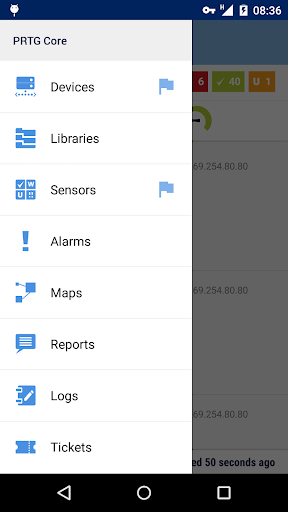
PRTG for Android brings the power of the PRTG Network Monitor interface to your Android 4.0+ devices.
It requires a PRTG 14.1 or higher installation.
If you encounter any bugs, please send them to [email protected], as were not notified of new comments.Features include:• Full visibility into the state of your probes, groups, devices, sensors, and channels on multiple PRTG instances.• Pause, acknowledge alarms, trigger scans, run device auto-discovery, etc.
You can do a lot of things with the app that you can over the web interface or the Enterprise Console, with an interface tailored to your mobile device.• QR code scanning makes it easy to jump directly to a sensor.• Enhanced notifications can (optionally) alert you in your devices status bar when PRTG finds problems on your network.• Home screen widgets (available only on 4.1 or higher, sorry!) allow you to keep an eye on your network without the app running in the foreground.• Network tools such as ping, traceroute, and DNS lookups are included.
Well be adding more in the future!To use this app, you need to run an installation of PRTG Network Monitor 14.1 or later that is accessible from the network your device is connected to.
If you dont have a PRTG Network Monitor installed, you can still try a demo account, and the network tools are completely independent and dont require any PRTG server to operate.Running an older version of Android or an older PRTG release?
You can still use our previous release, PRTGdroid: https://play.google.com/store/apps/details?id=com.paessler.prtgRequired Permissions:• INTERNET - Rather critical :-)• CAMERA - Required for the QR scanner.• WAKE_LOCK - Necessary for the alert functionality.
Dont worry, we put a lot of effort into keeping our battery and network use as low as possible.• Notifications can optionally VIBRATE your phone.• We use ACCESS_NETWORK_STATE and ACCESS_WIFI_STATE to check if the internet is available, and to determine whether or not we should load large graphs (we dont load them when youre on a mobile data network).• WRITE_EXTERNAL_STORAGE is needed to cache certain data.• RECEIVE_BOOT_COMPLETED lets us set notifications back up after a reboot.If you have any problems or suggestions, were happy to hear them.
Just send us an email at [email protected].
https://andro.io/app/prtgandroid
 Power 100


Android app profile
PRTG for Android for Android – Latest Version & Features
by Paessler AG
★★★★★
(0 ratings)
Rate this app
How do you feel about PRTG for Android?
Thanks for your feedback!
> 2.2k
Monthly Downloads
~$900
Estimated Cost
Screenshots




