
Photo-Shop is a popular and powerful image editing software,Image EditingLayers and MasksSelection ToolsFilters and EffectsText EditingDrawing and PaintingFile Formats and OutputHere are some key features and uses of AIVector Graphics CreationDrawing and IllustrationTypography and Text LayoutLogo and Icon DesignPrint and Web DesignPackaging and Label DesignFile Formats and IntegrationCorel is a vector graphics editor developed by Corel Corporation.
It is a popular software used for designing and creating vector-based artwork and layouts.
Corel offers a range of tools and features that allow users to create high-quality illustrations, logos, typography, and other graphical elements.Here are some key features and uses of Vector Graphics CreationDrawing and IllustrationTypography and Text Layout:Print and Web DesignLogo and Branding DesignPackaging and Label DesignFile Formats and IntegrationPaint is a simple raster graphics editor..
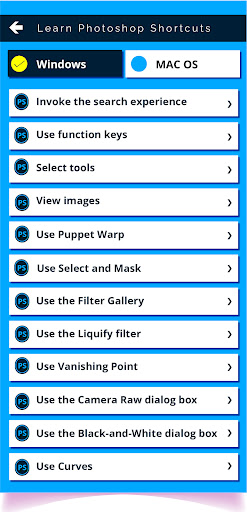
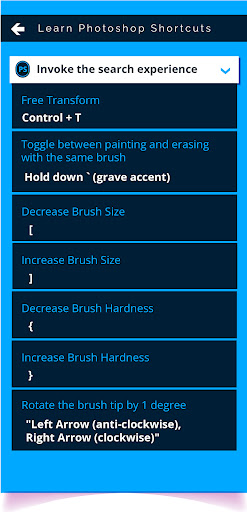
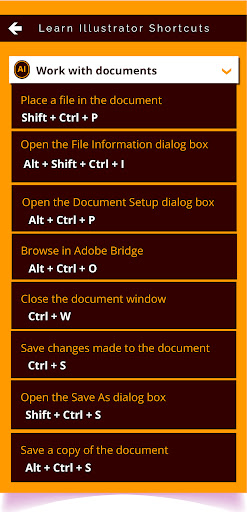
Paint provides basic drawing tools and features that allow users to create and edit simple images and graphics.Here are some key features and uses of PaintColor Selection and FillEditing ToolsHere are some commonly used shortcuts for PS, AI, Paint and CDRDrawing ToolsPSColor Selection and FillText ToolBasic Image ManipulationSaving and ExportingCtrl+N: Create a new documentCtrl+O: Open an existing documentCtrl+S: Save the current documentCtrl+Z: Undo the last actionCtrl+Shift+Z: Redo the last actionCtrl+C: Copy the selected elementCtrl+V: Paste the copied elementCtrl+T: Transform the selected elementCtrl+J: Duplicate the selected layerCtrl+Shift+E: Merge all visible layersCtrl+Alt+Z: Step backward through the historyCtrl+Alt+Shift+Z: Step forward through the historyAICtrl+N: Create a new documentCtrl+O: Open an existing documentCtrl+S: Save the current documentCtrl+Z: Undo the last actionCtrl+Shift+Z: Redo the last actionCtrl+C: Copy the selected elementCtrl+V: Paste the copied elementCtrl+T: Transform the selected elementCtrl+G: Group selected elementsCtrl+Shift+G: Ungroup selected elementsCtrl+Shift+O: Convert the selected text to outlinesCtrl+Alt+Shift+O: Convert all text to outlinesCDRCtrl+N: Create a new documentCtrl+O: Open an existing documentCtrl+S: Save the current documentCtrl+Z: Undo the last actionCtrl+Y: Redo the last actionCtrl+C: Copy the selected elementCtrl+V: Paste the copied elementCtrl+T: Transform the selected elementCtrl+G: Group selected elementsCtrl+U: Ungroup selected elementsCtrl+Shift+Q: Convert the selected text to curvesCtrl+Alt+Shift+Q: Convert all text to curvesPlease note that these shortcuts are commonly used, but there may be additional shortcuts available in each software depending on the version and personal preferences.-----------------------------More than 1000+ shortcuts keys provided of multiple Software learning become easier for both windows user as wel as mac user photo editing software become very very easy and faster .
https://andro.io/app/photoshopshortcuts
 Power 100

Android app profile
Graphic Tools Shortcuts Keys for Android – Latest Version & Features
★★★★★
(0 ratings)
Rate this app
How do you feel about Graphic Tools Shortcuts Keys?
Thanks for your feedback!
> 2.2k
Monthly Downloads
~$900
Estimated Cost
Screenshots









