
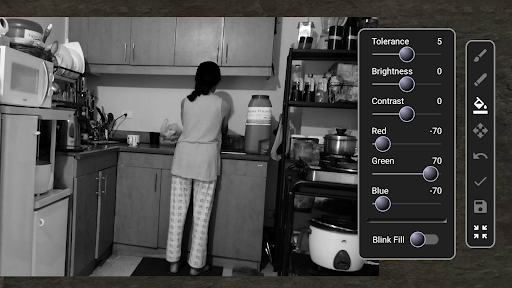
Notable Features includes:1) Bucket Fill Selection tool with Tolerance slider for a faster way of painting.2) [2-Tap] Paint : Users not being able to see properly the cursor during paint mode is because it is being covered by the finger thats doing the coloring.
Users can use this feature wherein they could first tap on the place they want to start paint selecting or erasing, then do a second tap (plus hold and drag) anywhere on the photo to control and move the paint cursor.
So being left-handed or right-handed doesnt really matter, you can prevent the cursor from being obscured when painting.3) Blink Fill - shows the user what pixels are currently being selected or modified.
Most useful when painting corners and borders.List of all features:1) Paint Selected mode (with Tip diameter size slider)2) Erase Selected mode (with Tip diameter size slider)3) Bucket Fill Selection mode (with Tolerance slider)4) Undo feature5) Blink Fill option6) Apply - click apply before using another color to color a new section.7) Re-center and scale image to default position and size.8) Contrast, brightness, red, green, and blue color sliders.9) Mouse compatible.
https://andro.io/app/photocolorchanger




Android app profile
Color or Recolor your Photos for Android – Latest Version & Features
by BadonguTech
Power 100
Rate this app
How do you feel about Color or Recolor your Photos?
Thanks for your feedback!
> 2.2k
Monthly Downloads
~$900
Estimated Cost
Screenshots




