
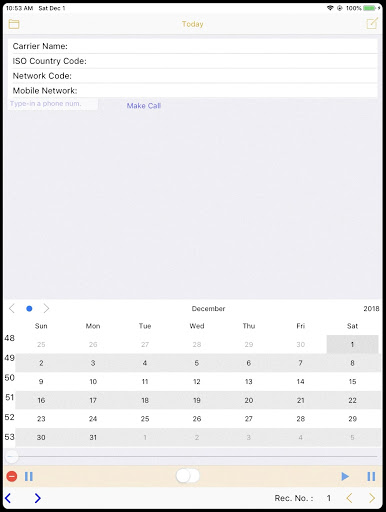
CallPhoneCall is the ultimate telephone memo app that allows you to easily record and manage phone voice memos.
With features like passcode security for privacy, saving recorded memos to the diary calendar, and displaying phone carrier and country code, its the perfect solution for organizing your phone calls and voice memos.You can record daily telephone memos and view date count with just a few taps.
Plus, you can write text record for phone call content and play memo voice whenever you need to.Our app is user-friendly and straightforward.
To get started, simply check the phone status, input the phone number, and press [RECORD] to record memo voice.
Press [STOP] to stop recording and [Memo] to add text record.
Click [List] to see your history and double-click the date to quickly browse phone call voice memo.FAQ:Q: How do I set a passcode for the app?A: You can set up and confirm a passcode with any combination of numbers and/or letters you choose.Try CallPhoneCall today and experience the convenience of effortless phone call and voice memo organization.
For more information, visit our website at https://hanchanglin.wixsite.com/website
https://andro.io/app/phonecallcalendar2
 Power 100


Android app profile
CallPhoneCall - Telephone Memo for Android – Latest Version & Features
★★★★★
(0 ratings)
Rate this app
How do you feel about CallPhoneCall - Telephone Memo?
Thanks for your feedback!
> 2.2k
Monthly Downloads
~$900
Estimated Cost
Screenshots









