
The new Willis Towers Watson ‘Track My Pension’ app makes it easy for you to keep up to date with your pension arrangements.
If you have a defined contribution pension that is administered by Willis Towers Watson and your employer has signed up to receive the application, then you can now use your mobile device to view and track your pension.This app is non-transactional and displays key elements of your pension funds.
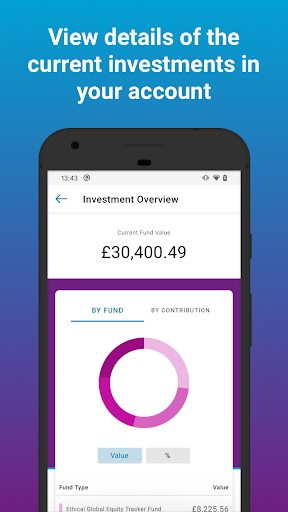
You can login using either fingerprint, face unlock or create a 6-digit pin.From the Home Screen - View Investment Overview - details of the current balance of your account, split by the fund types Add multiple accounts - if you have another WTW managed account View Investment Decisions - shows details of any personal fund choices and strategy options View Unit Price History - shows fund performance for the selected funds over a specific period, alongside the current balance invested in this fund View Transactions - shows the totals of transactions made on your account View Projected Benefits - some schemes also show an estimate of what your pension could be when you retireThis App currently supports Android versions 7 and above.Setup and Install by 3 simple steps:1.
RegisterTo register for the app, logon to the Willis Towers Watson ePA Pension website by clicking on the link:https://epa.towerswatson.com/pls/paweb/ww_pa.homepage.Go to the ‘Mobile App’ option under ‘Settings’, approve the T&C’s.
Select the ‘Generate Passcode’ button on the screen to obtain login credentials for the app.If you don’t have the login credentials to access your ePA pension account please contact our Service Desk using the email address provided on the website above.2.
InstallDownload the ‘Track My Pension’ mobile app to your device.3.
Login and access your ‘Track My Pension’ app.To login to the app, enter the Username and Passcode credentials that were displayed during registration on the ePA pension website.
To access the app in future you can save your credentials to fingerprint, face unlock or create a 6-digit pin.
https://andro.io/app/pensions
 Power 100



Android app profile
Track My Pension for Android – Latest Version & Features
★★★★★
(0 ratings)
Rate this app
How do you feel about Track My Pension?
Thanks for your feedback!
> 2.2k
Monthly Downloads
~$900
Estimated Cost
Screenshots









