
It is a stack pdf scanner.
"Photos to PDF Converter" is an Android mobile app that allows Android devices to be used as image scanners.
It allows users to scan documents (by taking a photo with the devices camera) and share the photo as either a JPEG or PDF.
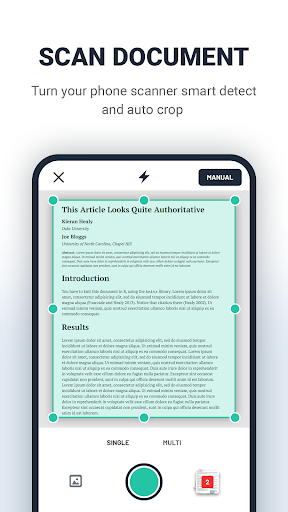
This app is available free of charge on the Google Play Store.The "Photos to PDF Converter"(mobile Scanner app) is as a photo and document scanner that creates PDFs and automatically recognises text.Scanner PDF app will maximize your document management efficiency : a mobile scanner for your smartphone, to change paper into PDF, while saving both time and storage."Photos to PDF Converter" app supports image processing and can transform, rotate, sharpen your images, for best document quality, combined with Scanner PDFs top edge OCR engine.1)Scan documents in a snap.With the Scan app, easily capture and convert documents, forms, business cards and whiteboards into high-quality PDFs.
And with different capture modes along with automatic boundary detection, you can get the best scans every time.2)AI-enhanced scansScan uses AI to correct image perspective, sharpen handwritten or printed text and remove glares and shadows.
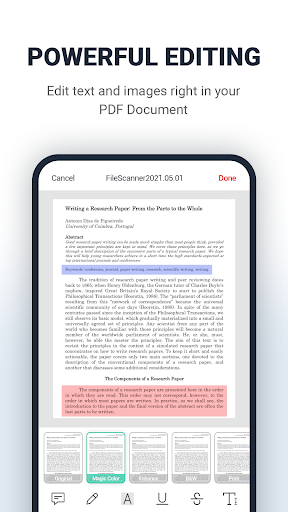
With OCR (optical character recognition), you can convert scanned documents into editable, searchable PDF files instantly.
Easily extract text and type new text in customised fonts that match the original file.3)Document EditingUsers can make annotations, add watermarks, signature on the scan or documents imported from local folder.4)VARIOUS SCANNING MODES–ID CARD & PASSPORT: A mode specifically designed for fast and convenient scans of ID documents.–QR CODE: Scan any QR code with the camera on your mobile device.5)Fill and sign a PDFeSign documents.
Sign a document yourself or send a signature request to others.6) QR Code ScannerQR Code Scanner is the perfect tool to scan your QR codes anytime and anywhere.
Now you can easily and quickly Generate, Download and Scan your QR codes all in one placeThis is The Best Document and Photo Scanners of 2023.
totally free & unlimited photo scan to pdf.
https://andro.io/app/pdfeditor-1h1au

Rate this app
How do you feel about Photos to PDF Converter?
Thanks for your feedback!
> 2.2k
Monthly Downloads
~$900
Estimated Cost
Screenshots









