
*** Klwp Pro and Nova Launcher Prime are required *** + Please set the Transition Effect of Nova Launcher to None.
This will make the theme run smoother.+ Supported different aspect ratios.
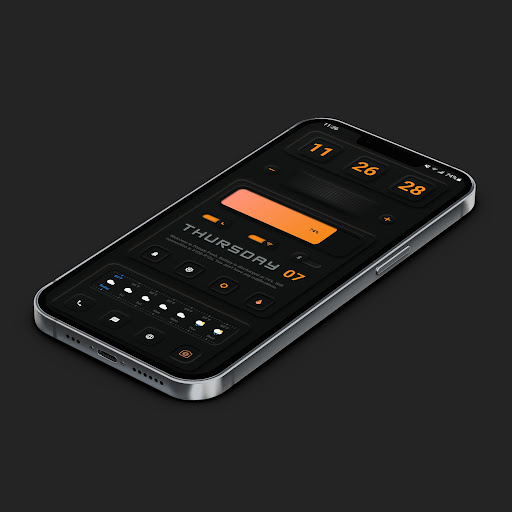
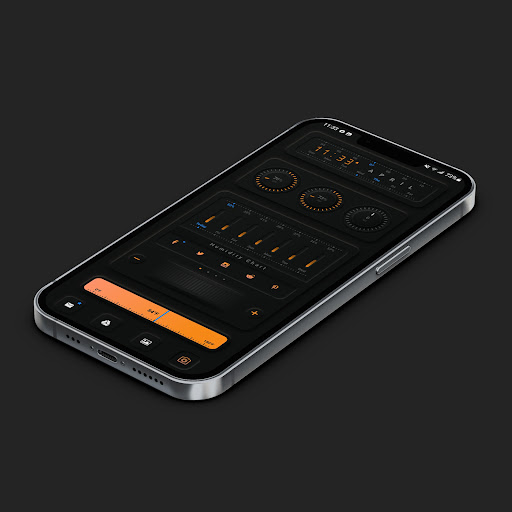
+ Themes are designed follow Neumorphic styles with cool animation and very functional.
+ Totally 4 themes.
Please read more details about the description of Themes Specifications that is placed inside each theme.
+ Each theme has 4 main sections: Music Player ( with animated music visualization), Calendar with detail events, Weather, News feeds.
+ Switching easily between Dark mode, Light mode, and colors.
Please look at the video to see how themes work.
https://m.youtube.com/watch?v=rNVXOeYRTDg + Please note that: some widgets will not be shown up if this app is uninstalled.
Notes: 1.
This is not a standalone app.
You need: Nova Launcher Prime, KLWP pro to run it.
2.
In Nova Settings, you need to do: A.
Homescreen -> Dock -> Disable it B.
Homescreen -> Page Indicator -> None C.
Homescreen -> Advanced -> Show Shadow, off D.
App Drawer -> Swipe Indicator -> off E.
Look and Feel -> Show Notification Bar -> off E.
Look and Feel -> Hide Navigation Bar -> checked You can check out some tutorial materials about how to config Nova Settings, enable wallpaper scrolling, replace default apps with your own apps, change news source...in the folder below: https://drive.google.com/folderview?id=14Bh4q7ejEXeOnCg4FcDHDoQeEfCOdTXe Credits to authors of templates:+ @vhthinh_at+ http://istore.graphics+ Kreativa+ InstaMocks If you have any troubles in using the theme, please email me.
My email: [email protected] you very much.
https://andro.io/app/pack-1k1t6
 Power 100


Android app profile
Neumorphic KLWP theme Vol 1 for Android – Latest Version & Features
by DSHDinh
★★★★★
(0 ratings)
Rate this app
How do you feel about Neumorphic KLWP theme Vol 1?
Thanks for your feedback!
> 2.2k
Monthly Downloads
~$900
Estimated Cost
Screenshots




