
ATTENTIONThis is not a stand-alone app.
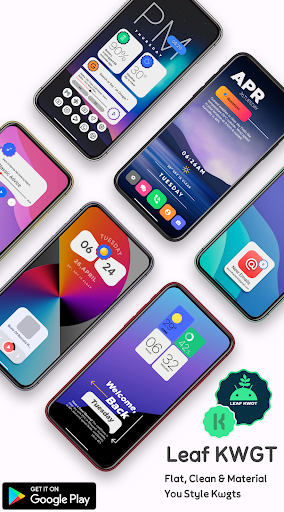
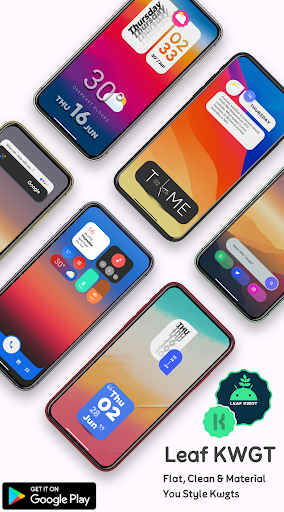
GlassUi KWGT requires KWGT Pro [PAID APPLICATION].Leaf KWGT is Made For futuristic and Beautiful Home Screens.
How to set up the widgets?You Need to download 2 apps 1.
KWGT: https://play.google.com/store/apps/details?id=org.kustom.widget&hl=en_IN2.
KWGT Pro Key: https://play.google.com/store/apps/details?id=org.kustom.widget.pro&hl=en_INUsing a Custom launcher LikeSome Popular Custom launchers are Nova, Lawnchair, Smart Launcher 5, etc.How to Use :1.
DOWNLOAD Leaf KWGT & KWGT Pro Application2.
Long tap on your home screen & choose the widget option3.
Choose the KWGT widget from the drop-down list4.
Tap on the widget, choose installed & select Leaf KWGT5.
Choose the widget you like & adjust scaling as per the home screen6.
Congratulations!
You are good to go.NOTE:If a particular widget is not properly scaled, you can adjust the size with SCALE under the layer option in the KWGT main editor.Credits: -- Jahir Fiquitiva for creating Kuper Dashboard which allows for easy app making
✅ Follow Me For More
✅Twitter :-
🐥https://twitter.com/Ahmadansari2233?s=09Instagram :-
📷https://www.instagram.com/ahmadhacker45/Facebook :-
🧒https://m.facebook.com/ahmad.ansari.52/about
https://andro.io/app/pack-1aus0
 Power 100


Android app profile
Leaf KWGT for Android – Latest Version & Features
by Ahmad Ansari
★★★★★
(0 ratings)
Rate this app
How do you feel about Leaf KWGT?
Thanks for your feedback!
> 2.2k
Monthly Downloads
~$900
Estimated Cost
Screenshots









