
Thanks to the 1login application from WP, you will additionally secure access to your 1login account from WP.
Enable two-factor login and confirm login on your phone or tablet.
You can do this in two different ways.1.
Logging in by notification.
Well send you a notification every time you log in.
You will log in when you click YES2.
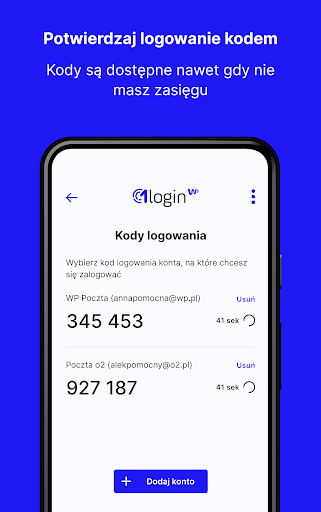
Login with a code.
To confirm logging in, you will enter the code from the application.
You have access to the codes even if your device is not connected to the Internet.Do you want to log in even easier?
You can add the devices you use on a daily basis to your trusted ones.
Then you log in to them without confirming access in the application.Why should I turn on two-factor logging?Two-step login is an additional protection of your account against unauthorized persons.
Thanks to it, even if someone knows the password, they will not log into your account without your consent.
In the first step of logging in, you enter your e-mail address or login and password.
In the second step, you enter the code from the 1login mobile application from WP or receive a notification on your phone or tablet.
They will not be given to an unauthorized person.
Even if he knows your password and goes through the first stage.Do you have any questions?
Find out more or contact uswith us on the website pomoc.wp.pl
https://andro.io/app/onelogin-189zw
 Power 100



Android app profile
1login od WP for Android – Latest Version & Features
by Wirtualna Polska Media S.A.
★★★★★
(0 ratings)
Rate this app
How do you feel about 1login od WP?
Thanks for your feedback!
> 2.2k
Monthly Downloads
~$900
Estimated Cost
Screenshots









