
Smart view, folder play, sound enhancing, crossfading.
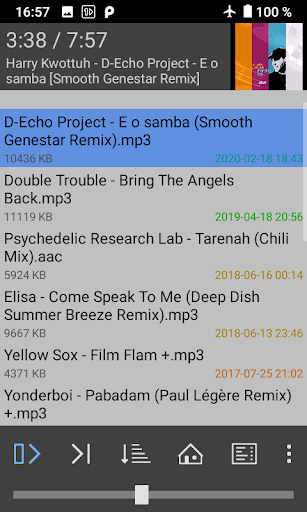
1by1 plays audio files directly from folders.
No need for playlists or media databases.
With its clear and simple user interface it does not waste your time and battery with unneeded visualisations.Resume play remembers track and position - also for different folders.
Bookmarking of tracks, positions, lists.
File finder (long press on a folder).
Directory finder.
Sort, shuffle and repeat modes.Audio enhancers for consistent volume and powerful sound.
Gapless and Crossfade for smooth transitions.
Mono mix.
Fast play.
Note: The DSP needs "Internal decoding" enabled in the settings on Android 4.1 or newer.Exportable internal playlist, M3U/M3U8 playlist support, Webstream play (by URLs in M3U playlists).
Track coloring by month or name.
Cover art (disableable).
Shortcuts by button long press.
Sleep timer.
Very small app size, ad-free.Supported types (depending on the system): MP3, OGG, AAC, MP4, WAV, FLAC, OPUS.
Note: OPUS only with OGG-extension in Android 5 and 6.
No files shown?
Please check the permissions.
Problems, crashs, bugs?
Please write an e-mail.
This helps more than an untracable 1-star rating, thanks!Permissions: Wake lock (keep playing on screen off), Write on SD card (track delete, playlist export), Internet (webstreaming), Bluetooth (connect options).
https://andro.io/app/onebyone-kkj3
 Power 100


Android app profile
1by1 Directory Player for Android – Latest Version & Features
by mpesch3
★★★★★
(0 ratings)
Rate this app
How do you feel about 1by1 Directory Player?
Thanks for your feedback!
> 2.2k
Monthly Downloads
~$900
Estimated Cost
Screenshots









