
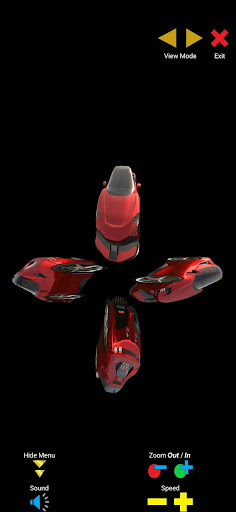
𝗢𝘃𝗲𝗿 𝟭𝟬𝟬 𝗛𝗼𝗹𝗼𝗴𝗿𝗮𝗺 𝗢𝗯𝗷𝗲𝗰𝘁𝘀 𝘁𝗼 𝗲𝘅𝗽𝗹𝗼𝗿𝗲!More than simply Hologram (360 Rotation, Control, Double Layer, Reactions, Customizable Music, Zoom In/Out, Special Effects) View Object in 360 Degrees with 16 ImagesThis is done by uploading 16 images of an object in anti-clockwise direction Sequence.
The app will piece them together to form a 360 degrees rotational object.
𝐔𝐬𝐞𝐬:1.
𝐌𝐢𝐬𝐬𝐢𝐧𝐠 𝐲𝐨𝐮𝐫 𝐥𝐨𝐯𝐞 𝐨𝐧𝐞𝐬?
Get them to stand stationary, and take their photo shots in 16 directions.
Each 90 degrees will be around 3 directional shots.
When uploaded, you can view and rotate the object in 360 degrees.2.
𝐌𝐞𝐫𝐜𝐡𝐚𝐧𝐝𝐢𝐬𝐞?
Place object on a circular platform swivel, and take the product photo shots without moving by rotating it in 16 directions.3.
𝐒𝐮𝐫𝐫𝐨𝐮𝐧𝐝𝐢𝐧𝐠 𝐬𝐡𝐨𝐭?
Stand at a point, and take 16 photos by rotating yourself in 16 directions and upload the image sequence in anti-clockwise direction.4.
𝟑𝐃 𝐌𝐨𝐝𝐞𝐥?
Screenshot 16 photos by rotating the 3D Model in 16 directions and upload the image sequence in anti-clockwise direction.5.
𝐒𝐤𝐞𝐭𝐜𝐡?
Create 16 digital art pieces (png or jpg format) from 16 imagined directions and upload the image sequence in anti-clockwise direction.𝐅𝐮𝐧𝐜𝐭𝐢𝐨𝐧𝐬:[1] Hologram Feature -includes auto rotation, manual rotation, enlarged one sided display, rotation delay control, sensitivity swipe control, double layer hologram, customizable background music, customizable background layer, reaction on double tap, zoom in/out feature, drag-drop feature, rotate orientation.[2] GIF Encoder -Upon saving path, app will generate a GIF onto ones DCIM folder with the folder name 3D Hologram Projector 360.
[3] To view an Object in 360 degrees -This can be done by swiping left or right in either minimized or maximized mode.-This includes sensitivity control (+ - buttons at the main) for swipe gestures[4] Double Layer Hologram (View Mode)-contains [a] Background Layer, [b] Front Layer and [c] Background Music-this provides a 4D experience for an immersive experience (depth, width, height, and sound).[5] Customizable Background Music (for each path)-Volume is adjustable using the phones system Media Volume.[6] Customizable Background Layer for Double Layer Hologram mode -Note: The first path (BG) is your background layer.
It can be animated by putting it in the correct sequence of 16 images.[7] Hologram Object Reacts on Double Tap-Reacts with animation and sound that are customizable.
-3 customizable reactions for each object.
-Note: Applicable only to single side and double layer hologram view modes.
[8] Gallery-Over 100 Hologram Objects to explore!-Ready-made Objects that are available in the Gallery for Hologram and 360 rotation view.-Ready-made GIF Objects that are available in GIF Gallery for Hologram view.[9] Special Effects-Choose from a range of specially selected special effects.-These special effects will spice up your Hologram.-Available in Single View Mode and Double Layer Hologram Mode[10] GIF file to Hologram-Open any GIF file from device and it will convert it into a ready-to-view Hologram.
This option can be found at GIF Gallery.[11] Drag-Drop Feature-Once Drag mode is activated, hologram can be re-positioned to any place of the devices screen.-Drag button can be found beside Zoom in/out buttons.[12] Rotate Orientation 𝐈𝐝𝐞𝐚𝐥 𝐀𝐬𝐩𝐞𝐜𝐭 𝐑𝐚𝐭𝐢𝐨 for 4 𝙎𝙞𝙙𝙚𝙙 𝙃𝙤𝙡𝙤𝙜𝙧𝙖𝙢: 1:1 (𝑾𝒊𝒅𝒕𝒉 : 𝑯𝒆𝒊𝒈𝒉𝒕)1 𝙎𝙞𝙙𝙚 𝙃𝙤𝙡𝙤𝙜𝙧𝙖𝙢: 19:23 (𝑾𝒊𝒅𝒕𝒉 : 𝑯𝒆𝒊𝒈𝒉𝒕)𝑫𝒐𝒖𝒃𝒍𝒆 𝑳𝒂𝒚𝒆𝒓 𝑯𝒐𝒍𝒐𝒈𝒓𝒂𝒎: Background Layer: 36:23 (𝑾𝒊𝒅𝒕𝒉 : 𝑯𝒆𝒊𝒈𝒉𝒕)𝐑𝐞𝐪𝐮𝐢𝐫𝐞:-Plastic Pyramid(s) (either triangle or trapezium)Kindly check my Youtube channel for 𝐮𝐩𝐝𝐚𝐭𝐞𝐬 and 𝐰𝐚𝐥𝐤𝐭𝐡𝐫𝐨𝐮𝐠𝐡𝐬https://www.youtube.com/@kevtutorials/videosor Search on Youtube the keywords Kevin Tan Wei Huang
https://andro.io/app/objectviewer
 Power 100


Android app profile
3D Hologram Projector 360 for Android – Latest Version & Features
★★★★★
(0 ratings)
Rate this app
How do you feel about 3D Hologram Projector 360?
Thanks for your feedback!
> 2.2k
Monthly Downloads
~$900
Estimated Cost
Screenshots









