
MyInepro is an app that end-users, such as students and/or employees, can use to keep track of their accounts.
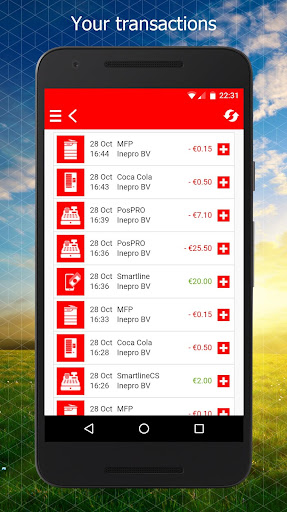
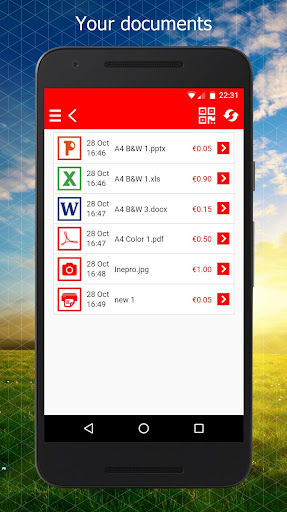
At a glance, the app shows the users credit and expenses, allows them to top up their credit, to manage and edit documents in the print queue, to remove their card (if lost) and much more.
MyInepro has been developed according to our high security standards.
Only you have access to your data.
Keep your username and password secret.The MyInepro app is for everyone who uses an Inepro solution within an organization.
Whether its a printing solution, a cashless vending solution, a cashless catering solution or a combination of solutions.
See all the possibilities at inepro.com/solutions.
Activate the app by filling in your username, password and organization code in the login screen.RegisterTo use MyInepro, register by filling in the following details in the login screen;- Username (for example, your email address);- Password;- Organisation code.For whom?Everyone who uses an Inepro solution within an organization.
Whether its a printing solution, a cashless vending solution, a cashless catering solution or a combination of solutions.
See all the possibilities at inepro.com/solutions.SafetyMyInepro has been developed according to our high security standards.
Only you have access to your data.
Keep your username and password secret.
Want to know more about security?
Go to www.inepro.com/myinepro/veiligheidFeatures - View balance- Full overview of transactions- Top up balance through internet payment- Preview of sent print jobs- Edit the number of print jobs sent- Change colour printing to black and white on sent print jobs- Delete queued print jobs- Release/print queued print jobs through the QR code scanner using the - mobile device at a printer or an MFP - Select cost center for a queued print job- User settings such as language preference- Delete means of identification (such as a payment card) if lost
https://andro.io/app/myinepro
 Power 100


Android app profile
MyInepro for Android – Latest Version & Features
by Inepro B.V.
★★★★★
(0 ratings)
Rate this app
How do you feel about MyInepro?
Thanks for your feedback!
> 2.2k
Monthly Downloads
~$900
Estimated Cost
Screenshots









