
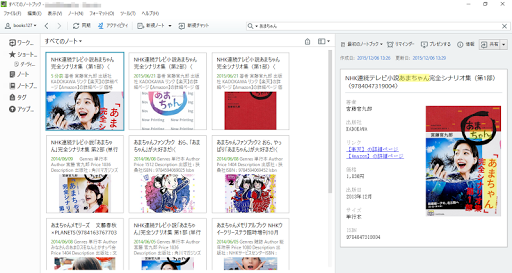
To the Evernote to book management tool, it is the book data input app for Evernote.(Previously, but it was the application corresponding to the Springpad, for the service had ended, we have changed the corresponding platform to Evernote.)Just read the bar code of books, to get the book data from the Web, you will be able to automatically register the data in Evernote.
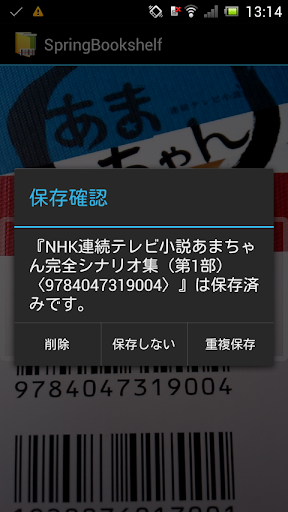
For such old books with no bar code, it is corresponding to the search by keyword.● preparation ofUser authorization for using EvernoteIf that has not been using Evernote, in order to use the Evernote, please do the user registration.And books create a registration for notebookPlease create a notebook to register the book data.There is no hindrance to the operation without creating a notebook.● after installation work· Initial settingWhen you start the app, first, you will be carrying out the access authentication to Evernote.Then, you will make the option settings.It will make a selection of items to register as a tag (publishing company and the authors name).Next, you want to select the notebook to register the books.● How to useWhen you select the "bar code scan" in the menu, you will bar code reading mode.Bar code book has become upper and lower stages but, ISBN code to collect the book data is top.Please read the upper bar code.
(In the lower part of the bar code will fail to collect books data.)If you press the Cancel button to return to the menu screen.When you select the "keyword search", it becomes the mode of the book search by keyword.The "Options", you can redo the initial setting.● About duplicate registrationIf you want to try to enter the same book, a confirmation dialog box will appear.You can select one of the "Delete", "overlap save", "do not save.""Delete" is able to delete the data registered, when it is such as to dispose the book, it assumes when deleting data from Evernote.● OtherThe Amazon and the link to the optimism that is in the registered book data, its embedded affiliate key.
https://andro.io/app/mobagitukai
 Power 100

Android app profile
Evernoteで書籍管理 SpringBookshelf for Android – Latest Version & Features
by mobagitukai
★★★★★
(0 ratings)
Rate this app
How do you feel about Evernoteで書籍管理 SpringBookshelf?
Thanks for your feedback!
> 2.2k
Monthly Downloads
~$900
Estimated Cost
Screenshots









