
Mix Photo Editor, Mix Photo Collage Editor or MixPhot is app to merge some photos to one image.Sometimes we have some photos and need to watch in one time shoot, so this app can be used to meet this need.How to use Mix Photo Editor or Mix Photo Collage Editor or MixPhot app?Following is the steps how to use Mix Photo Editor or Mix Photo Collage Editor or MixPhot app:1.
Download download Mix Photo Editor or Mix Photo Collage Editor or MixPhot app from play store2.
Click icon Mix Photo Editor or Mix Photo Collage Editor or MixPhot from your homescreen smartphone3.
If permission to access photo is appear, please click agree.4.
Browse the photos from the folder two times click5.
You can adjust the photos to be at the front by just click the photo at the screen of Mix Photo Editor or Mix Photo Collage Editor or MixPhot app.6.
You can move the photos on screen by just click and move the photo at the screen of Mix Photo Editor or Mix Photo Collage Editor or MixPhot app.7.
You can enlarge the photo by just pitch the photos on screen by just click and move the photo at the screen of Mix Photo Editor or Mix Photo Collage Editor or MixPhot app.8.
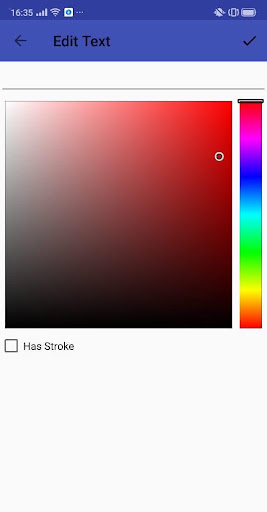
You also can add the text on the screen of Mix Photo Editor or Mix Photo Collage Editor or MixPhot app by just click text button.9.
You can change the color of the text on the screen of Mix Photo Editor or Mix Photo Collage Editor or MixPhot app by just click the color menu.Enjoy Mix Photo Editor or Mix Photo Collage Editor or MixPhot app!
https://andro.io/app/mixphot
 Power 100

Android app profile
PHOTO MIXER APP for Android – Latest Version & Features
by User Aja
★★★★★
(0 ratings)
Rate this app
How do you feel about PHOTO MIXER APP?
Thanks for your feedback!
> 2.2k
Monthly Downloads
~$900
Estimated Cost
Screenshots









