https://andro.io/app/miskinsavatarforminecraft
 Power 100



🌞
📢Turn minecraft skins into fun artistic avatars!!!
🌞
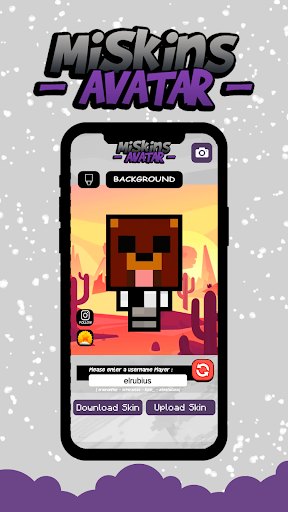
👀Search for your favorite character by username and with a button change the appearance of your game profile.
👉With this app, you will make everyone jealous.
👉Show your personality, using the most impressive and attractive skins on your social network!
👉You can download each skin for free at the touch of a button!
👉When downloading, the skin will be saved in the gallery.
🌟How to use:
📌 Very fast and smooth user interface.
📌Enter the "username" you use in the game.
📌Press the "Update" button to view your character.
📌Press the "Border" button to add border to your character.
📌Press the "Download" button to save the skin to your gallery.
📌Select the downloaded skin from the gallery and enjoy!
🌟Important:
👉To download and view skins, an internet connection is required.
📖 Leave your wishes in the comments, we update the app regularly, we are constantly working to make the app better and more useful for you.
🤗
⚠️ Disclaimer:
⚠️Please note that this is an unofficial app for Minecraft™ Pocket Edition.
This app is in no way affiliated with Mojang AB.
Minecraft ™, the Minecraft ™ trademark and Minecraft ™ assets are the property of Mojang AB or their respected owner.
All rights reserved.
According to http://account.mojang.com/documents/brand_guidelines
Android app profile
Avatar Maker for Minecraft for Android – Latest Version & Features
by Kuyaiki
★★★★★
(0 ratings)

Rate this app
How do you feel about Avatar Maker for Minecraft?
Thanks for your feedback!
> 2.2k
Monthly Downloads
~$900
Estimated Cost
Screenshots
About Avatar Maker for Minecraft
🌞
📢Turn minecraft skins into fun artistic avatars!!!
🌞
👀Search for your favorite character by username and with a button change the appearance of your game profile.
👉With this app, you will make everyone jealous.
👉Show your personality, using the most impressive and attractive skins on your social network!
👉You can download each skin for free at the touch of a button!
👉When downloading, the skin will be saved in the gallery.
🌟How to use:
📌 Very fast and smooth user interface.
📌Enter the "username" you use in the game.
📌Press the "Update" button to view your character.
📌Press the "Border" button to add border to your character.
📌Press the "Download" button to save the skin to your gallery.
📌Select the downloaded skin from the gallery and enjoy!
🌟Important:
👉To download and view skins, an internet connection is required.
📖 Leave your wishes in the comments, we update the app regularly, we are constantly working to make the app better and more useful for you.
🤗
⚠️ Disclaimer:
⚠️Please note that this is an unofficial app for Minecraft™ Pocket Edition.
This app is in no way affiliated with Mojang AB.
Minecraft ™, the Minecraft ™ trademark and Minecraft ™ assets are the property of Mojang AB or their respected owner.
All rights reserved.
According to http://account.mojang.com/documents/brand_guidelines




