
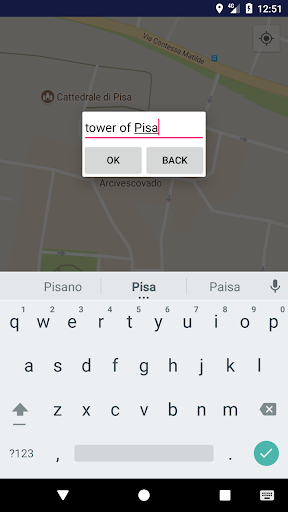
Create your own localized photo book.Long press over the location where you want to put the pin, then a window will be shown, there you need to put the name of the location(you can put any name you want).By clicking on the name over the pin a new window will be opened, there you can add pictures clicking on the light blue button on the down right corner.
To delete a picture or the pin you have to click on the menu in the top right corner and a menu will be openedOn the top right corner there is a button to center the map on your position(location permission must be enabled and location must be turned on).Enabling high accuracy location mode is needed to make the app more precise.You can do it from settings->location->modeIt is available the function to backup locally and restore the database of your pictures and your locations.To do backup/restore you need to go in the homepage and click on the menu in the top right corner and choose backup or restore.
If you choose restore you need to find the backup file named by the app MAPPHOTOBOOK_copy (you can rename it).In future the possibility to backup and restore the database in a remote location will be added.
https://andro.io/app/mapphotobook
 Power 100



Android app profile
Map photo book for Android – Latest Version & Features
★★★★★
(0 ratings)
Rate this app
How do you feel about Map photo book?
Thanks for your feedback!
> 2.2k
Monthly Downloads
~$900
Estimated Cost
Screenshots




