
Shoptree KDS (Kitchen Display System) is a partner app of the Shoptree POS & is provided to chefs using the Shoptree platform for managing their kitchen operations better.
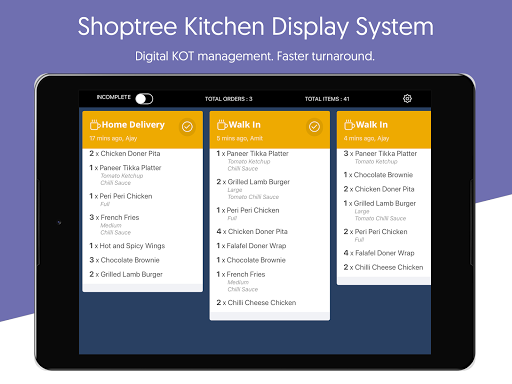
The KDS app essentially provides a list of KOTs based on order placement time with preparation-specific information such as item name, quantity, modifiers & options, special instructions for preparation given by customer, sales channel & time elapsed for each order.
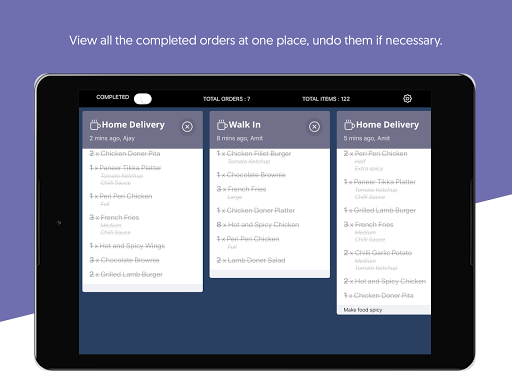
It also has toggle buttons to filter orders by statuses - Incomplete & Completed.
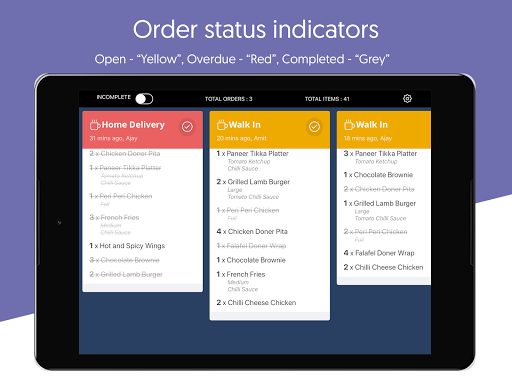
Shoptree KDS is another step towards making the management of a restaurant easier & better.Features: - Get the orders instantly from the POS- Swipe through all the incoming orders- Mark individual items in an order as complete/incomplete- Mark the entire order as complete/incomplete- Special indication for overdue orders- Notification sound for incoming orders- Notification sound (every 30 seconds) to indicate there is at least one incomplete order- Set the preparation time as you desire by going into Settings- Colour code for order status (Completed/Incomplete/Overdue)
https://andro.io/app/kds-1d129
 Power 100
Android app profile
Shoptree KDS for Android – Latest Version & Features
★★★★★
(0 ratings)
Rate this app
How do you feel about Shoptree KDS?
Thanks for your feedback!
> 2.2k
Monthly Downloads
~$900
Estimated Cost
Screenshots









