
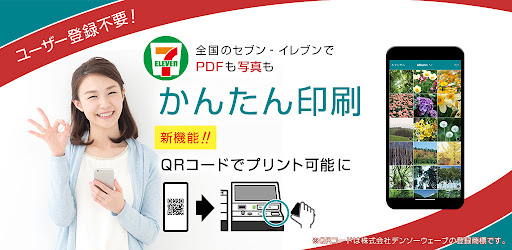
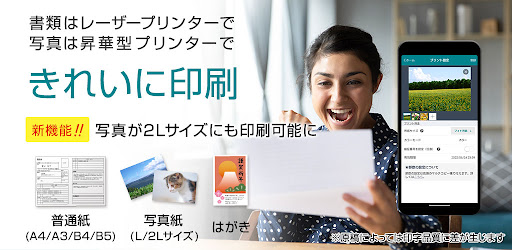
No troublesome membership registration is required.You can easily print PDFs and photos on your smartphone or on the cloud.You can print on the multi-copy machine in the store, so please leave it to us for sudden printing.■Convenient at times like this・There is no printer at home, the ink has run out, the paper is jammed・I want to print memories on the way back from the trip and give them to you・Printing resumes for job hunting・Print PDF files sent to smartphones・Web page coupon printing・Print travel e-tickets・Printed on "A3 size"- Printing files stored in cloud storage■ Files that can be printed・PDF・Photo (JPEG, PNG)・Windows version Microsoft Word/Excel/PowerPoint*For details, please check the URL below.https://www.printing.ne.jp/support/m_kantan/ad_attention.html■Printable paper・Plain paper (A3, A4, B4, B5)・Postcard・Photo paper (L, 2L size)■ Printing methodYou can print from the multi-function copier at Seven-Eleven in the following two ways.・Print using QR code1.
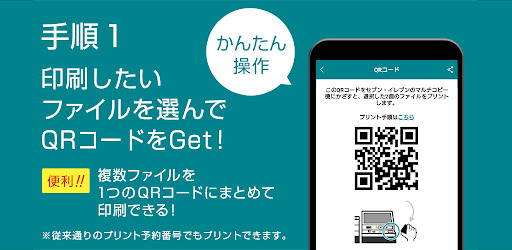
Select and register the file you want to print from the app2.
Display the "QR code" in the app3.
Go to the nearest 7-Eleven and hold the "QR code" over the multi-copy machine*You can hold up to 10 reservation numbers together in one QR code.・Print using reservation number1.
Select and register the file you want to print from the app2.
Check the "print reservation number" in the app3.
Go to the nearest 7-Eleven and enter the "print reservation number" into the multi-copier■Print feePlease pay at the time of printing at the Seven-Eleven multi-copy machine.*For details on printing fees, please see the URL below.https://www.printing.ne.jp/support/common/pricelist.html* Application download and file registration are free.■ Expiration date of the print reservation numberUntil 23:59 the day after the file registration date■ If you want to extend the print expiration datePlease download the "netprint" app, which requires membership registration.The print expiration date will be 7 days after the file registration date.If you need time to print it out, or if you want someone to print your reservation number for you, download the "netprint" app.For details on the differences from "Kantan netprint", see the following URL.https://www.printing.ne.jp/support/mobile/mobile.html■ When using- The print expiration date is until 23:59 the day after file registration.Please print it out by then.
If it has expired, you can print it by registering the file again.- You are responsible for the cost of communication.- This service can only be printed on multi-function copiers at 7-Eleven stores in Japan.- Service hours are 24 hours a day, 365 days a year.
However, there is maintenance once a month.- Other specifications and restrictions are described at the following URL.https://www.printing.ne.jp/support/m_kantan/ad_attention.html
https://andro.io/app/kantan-t9cb
 Power 100

Android app profile
かんたんnetprint-セブン‐イレブンでかんたん印刷 for Android – Latest Version & Features
by FUJIFILM Business Innovation Corp.
★★★★★
(0 ratings)
Rate this app
How do you feel about かんたんnetprint-セブン‐イレブンでかんたん印刷?
Thanks for your feedback!
> 2.2k
Monthly Downloads
~$900
Estimated Cost
Screenshots




