
[How to install]1.
Play Store app > Payment and installation on your smartphone2.
Run Play Store on Watch > Apps on your phone > Watchface name > Install[계속 설치 예정이라고 나타날때 해결 방법]1.
해당 워치페이스의 플레이스토어 주소 복사(플레이스토어 우측 상단 돋보기 옆 점 세개 클릭 > 공유) 2.
삼성인터넷으로 들어가서 다른기기에 설치 (워치 선택)3.
워치 재부팅 후 다른 워치페이스로 바꿨다가 다시 해당 페이스로 선택해서 확인해 보세요.4.
휴대폰과 워치의 구글 계정이 동일하게 연동되어 있는지 체크해 보세요.*****************************************************************[Notes on compatibility]if you see message "Your devices are not compatible", use Play Store on WEB browser from PC / Laptop instead of app on phone.[호환관련 주의사항]"귀하의 장치가 호환되지 않습니다"라는 메시지가 표시되면 휴대폰의 앱 대신 PC/노트북의 웹 브라우저에서 Play 스토어를 사용하십시오.****************************************************************** In order to use all functions, consent to use the sensor is required.* This watch face was developed with Samsungs new "Watch Face Studio" tool for devices based on the new Wear Os Google / One UI Samsung operating system like Samsung Galaxy Watch 4.* some features may not be available on some watches.* 모든 기능을 사용하기 위해서는 센서 사용 동의가 필요합니다.* 이 시계 모드는 Samsung Galaxy Watch 4와 같은 새로운 Wear Os Google / One UI Samsung 운영 체제 기반 장치용 Samsung의 새로운 "Watch Face Studio" 도구로 개발되었습니다.******************************************************************* information **1.
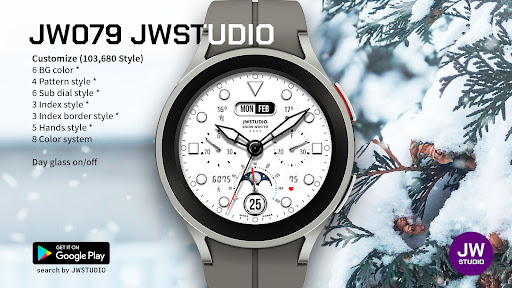
Various color combinations for each part can be changed.- 6 Bg color- 4 Pattern style- 6 Sub dial style- 3 Index style- 3 Index border style- 5 Hands style- 8 Point color- Day glass on/off2.
Please check the screenshot for other information and features provided.** How to set up a Customize **1.
Press and hold the watch face.2.
Press the Customize.3.
Set the Color or Complication.(Check the screenshot)4.
Press OK** Get new news from my Instagram.
**https://www.instagram.com/jenniferwatches/https://www.instagram.com/herawatchface/** 설명 **1.
꾸미기 기능으로 다양한 조합을 지원합니다.- 6 배경색- 4 패턴 스타일- 6 서브 다이얼 스타일- 3 인덱스 스타일- 3 인덱스 테두리 스타일- 5 핸즈 스타일- 8 포인트 칼라- 날짜 유리 디자인 on/ff2.
그 외 제공 정보 및 기능은 스크린샷을 확인해주세요.** 꾸미기 설정 방법 **1.
시계 화면을 길게 누르세요.2.
꾸미기 버튼 클릭3.
각 컴플리케이션 영역을 눌러서 해당 정보를 설정해 주세요.
(스크린샷 확인)4.
확인 클릭Contact me at [email protected] for any bug reports, requests, or queries.관련 문의는 아래메일로 연락 주세요.
[email protected]
https://andro.io/app/jwstudio-a-079
 Power 100


Android app profile
JW079 jwstudio watchface for Android – Latest Version & Features
by JWstudio
★★★★★
(0 ratings)
Rate this app
How do you feel about JW079 jwstudio watchface?
Thanks for your feedback!
> 2.2k
Monthly Downloads
~$900
Estimated Cost
Screenshots









