
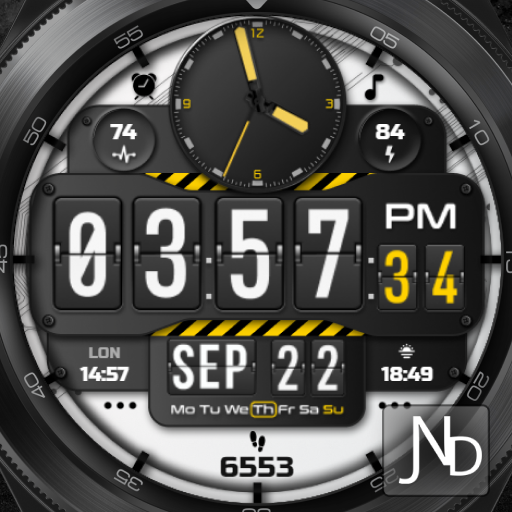
Presenting the JND0005 - A Modern looking Hybdrid digital watch face for Wear OS from JacoNaudeDesignThe JND0005 is a beautiful modern hybrid watch face with lots of information and a detailed design.
It has large flip style digits and a smooth looking analog watch on the top part of the face.
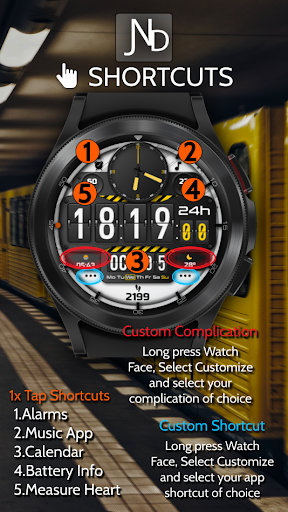
Features include, 5 Shortcuts, 2 Customizable shortcuts, 2 Customizable Complications, Battery, Date, Steps & Heart rate.
The face includes 12 & 24Hr versions.
A similar dark mode AOD ensures great style and battery life.
Thank you.INSTALLATION NOTES:1 - Make sure the watch and phone is properly connected.2 - Select target device from drop down in Play Store and select both Watch and Phone.3.
On your phone you can open up the Companion App and follow the instructions.After a few minutes the watch face will transferred on watch : check the watch faces installed by the Wearable app on the phone.Please NOTE:If you stuck at payment loop, or if the face does not show on the watch, DO NOT WORRY, only one charge will be made even if you are asked to pay a second time.
Wait 5 minutes or restart your watch and try again.
You can also connect to Wi-Fi on your watch and search for JND0005 and install it from the watch.Please, any problems on this side are NOT caused by the developer, we are working with Samsung and Google to provide a more seamless experience and it will get better.
Software is constantly being worked on and updated by all parties, please reach out if you have any problems.IMPORTANT NOTE:Please Make sure you have enabled all permissions from settings > applications.
And also when prompted after installing face and when long pressing to customize complication.INFORMATION ON HEART RATE:The first time you use the face or put on the watch the heart rate is not measured automatically.
To measure heart rate, please make sure that the screen is turned on and that the watch is worn correctly on the wrist.Tap the Heart rate shortcut.
It will turn red to show you it is measuring and white when it is done.
After the first manual measurement, the watch face willautomatically measure your heart rate every 10 minutes, or if you measure it manually.For any assistance please reach out to us at [email protected] FEATURES:Analog TimeDigital TimeBattery info Steps & Heart rateDate5 Shortcuts2 Customizable Shortcuts2 Customizable ComplicationsSimilar dark AODReach out to me on my other channels for ideas and promotions plus new releases.WEB: www.jaconaudedesign.comFACEBOOK: https://www.facebook.com/Jaconaudedesign-110829983803141/INSTAGRAM: https://www.instagram.com/jaconaude2020/Thank you and enjoy.
https://andro.io/app/jnd0005
 Power 100


Android app profile
JND0005 for Android – Latest Version & Features
★★★★★
(0 ratings)
Rate this app
How do you feel about JND0005?
Thanks for your feedback!
> 2.2k
Monthly Downloads
~$900
Estimated Cost
Screenshots









