
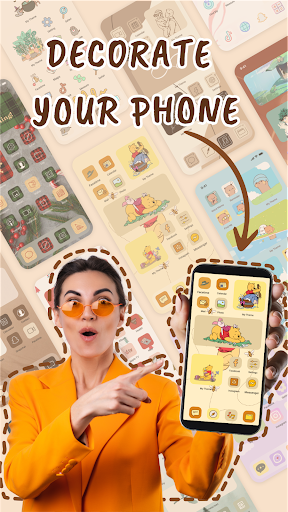
Welcome to 𝐌𝐲𝐓𝐡𝐞𝐦𝐞 – your ultimate tool for transforming the look and feel of your smartphone!
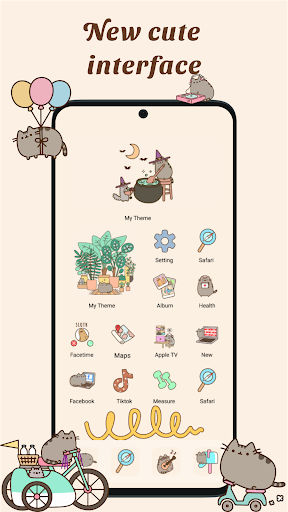
With MyTheme, you have the power to customize every aspect of your device, from themes and icons to widgets and wallpapers, all in one intuitive app.
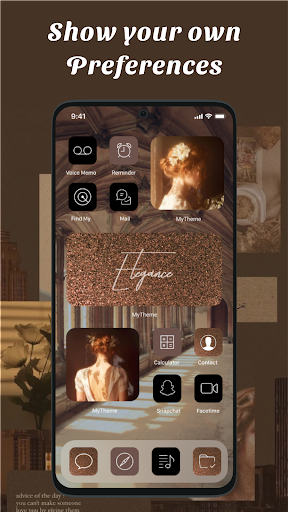
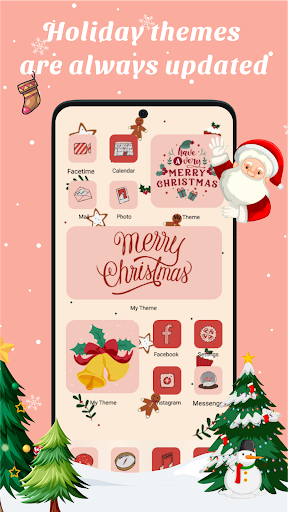
🎨 𝐓𝐡𝐞𝐦𝐞𝐬: Dive into our vast library of themes, carefully crafted to suit every style and preference.
Whether you prefer minimalist designs, vibrant colors, or artistic creations, MyTheme has something for everyone.
Express yourself with themes that reflect your personality and make your device stand out from the crowd.
🌟 𝐀𝐩𝐩 𝐈𝐜𝐨𝐧𝐬: Tired of the same old app icons?
MyThemes icon changer feature lets you swap them out with ease.
Choose from a variety of icon packs or even upload your own icons to create a truly unique look.
With MyTheme, the possibilities are endless when it comes to customizing your app icons.
📱 𝐖𝐢𝐝𝐠𝐞𝐭𝐬: Take your home screen to the next level with MyThemes customizable widgets.
From weather updates to calendar events, stay organized and informed with widgets that are as functional as they are stylish.
With MyTheme, you can tailor your widgets to suit your specific needs and preferences.
🖼️ 𝐖𝐚𝐥𝐥𝐩𝐚𝐩𝐞𝐫𝐬: Set the perfect backdrop for your device with MyThemes stunning wallpapers.
Whether you prefer scenic landscapes, abstract patterns, or sleek textures, our extensive collection has something to suit every taste.
Change your wallpaper to match your mood or switch it up to keep things fresh – the choice is yours.
✨
✨
✨ Download now and make your device truly yours!
✨
✨
✨------------------
🌟 𝐂𝐫𝐞𝐚𝐭𝐢𝐨𝐧 𝐓𝐨𝐨𝐥𝐬 - 𝐃𝐈𝐘 𝐅𝐞𝐚𝐭𝐮𝐫𝐞
🌟MyTheme allows you to creatively design your own themes, app icons, and widgetsDownload MyTheme, and youll get into a world of beauty created by yourself!
❤️ 𝐊𝐞𝐲 𝐅𝐞𝐚𝐭𝐮𝐫𝐞𝐬
❤️
👏3000+ Themes including
👏5000+ App icon packs
👏7000+ Widgets
👏Personalize your phone with aesthetically designed icons, themes, wallpapers, and widgets
👏Turn your phone into a piece of gorgeous art with 4K wallpapers
👏DIY your own personalized art of the lock screen, theme, icon, and widget
❉
❉
❉ 𝐅𝐀𝐐
❉
❉
❉
👉 𝐇𝐨𝐰 𝐓𝐨 𝐈𝐧𝐬𝐭𝐚𝐥𝐥 𝐓𝐡𝐞𝐦𝐞𝐬1.
Choose your favourite theme and click Apply2.
Select the icons you want to change for the applications and install them3.
Select the widgets and add to home screen4.
Set wallpaper for lockscreen and homescreenIf app ask for permission, Please Allow it to add shortcut icon on home page
❉ 𝐀𝐛𝐨𝐮𝐭 𝐓𝐨 𝐑𝐞𝐦𝐨𝐯𝐞 𝐖𝐚𝐭𝐞𝐫𝐦𝐚𝐫𝐤 𝐨𝐟 𝐀𝐩𝐩 𝐢𝐜𝐨𝐧𝐬On Android 8.0 and above, android system will automatically add a watermark of your app to the shortcut icon.
Using widget technology, We proving a way to avoid watermark icon and Newly created icon looks like pro.
👉 𝐇𝐨𝐰 𝐭𝐨 𝐔𝐬𝐞1.
Click Install any icon and there will be a pop-up window then click on the words "Click to Remove Watermark"2.
Click "Go to MyTheme to add Widget"3.
On home screen, long press (press & hold) a blank space, then click "Widgets"4.
Search for MyTheme -> Long Press "Create Shortcut (1x1)" and drag it to home screen5.
The widget of our app will be opened automatically.
After that you can change app icon without any Watermarks.𝐍𝐨𝐭𝐞:* For some devices using Android 14.0 such as Pixel, it is currently impossible to remove the watermark of app icons* For some devices (like Vivo) that dont give home screen shortcuts by themselves, you usually go to other settings -> Click on manage permissions via new view and select desktop shortcuts -> Find apps MyTheme and turn On* If the widgets are not refreshing on your phone, go to Settings in the app > enable the "Allow Apps to run in the background" option.
❉
❉
❉ 𝐂𝐨𝐧𝐭𝐚𝐜𝐭
❉
❉
❉ Tell us your ideas for the MyTheme app so we can improve and update it.
Please contact us via email: [email protected] love to hear from you!
https://andro.io/app/iconchanger-1owgr
 Power 100
Android app profile
MyTheme: Icon Changer & Themes for Android – Latest Version & Features
★★★★★
(0 ratings)
Rate this app
How do you feel about MyTheme: Icon Changer & Themes?
Thanks for your feedback!
> 2.2k
Monthly Downloads
~$900
Estimated Cost
Screenshots









