
With the Enefit Volt Home electric car charging Application, you can save up to 50% on electric car charging costsThe Application is intended for customers of Eesti Energia AS, SIA "Enefit" and Enefit UAB who have purchased or rented an Enefit Volt smart home Charger.The Application allows the User to control the Charger, set different charging schedules and monitor the charge usage history.
In order to create smart charging schedules, Nord Pool Spot power exchange price information is displayed and used in the Application.
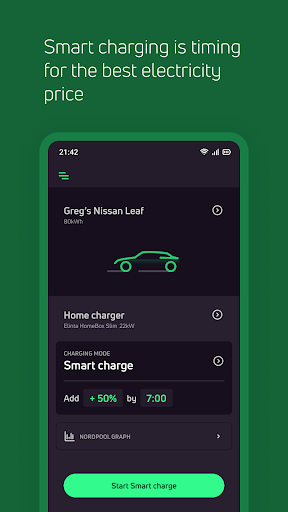
Application Features:SMART CHARGINGThe electric car charging schedule is set automatically according to the cheapest electricity power exchange price.
The User enters the capacity of the battery of their electric car, selects the desired charging volume in kilowatts and the desired end time when charging must be completed.
The Application automatically chooses the lower-priced hours after the Nord Pool Spot power exchange and charges the desired volume during them.TIMED CHARGINGThe charging schedule of the electric car is set according to the start and end time selected via the Application by the User.
CHARGE NOWThe User can use the Application to initiate charging of the electric car immediately.
Charging finishes after the User has stopped charging or when the car battery is full.CHARGING HISTORYThe history of charging sessions is stored in the Application and the User can view their car’s charging history by different time periods: day, week, month, year.The power exchange price information comes from Nord Pool Spot power exchange and is displayed to the User according to the price area where the Charger is installed.Application Deployment:In order to use the Application, an e-mail with account activation information will be sent to the Users e-mail address.Upon first login, the User can create a personal password using a code.
In future, the User can use this password to log in to the Application.
https://andro.io/app/homecharging
 Power 100


Android app profile
Enefit Volt Home for Android – Latest Version & Features
★★★★★
(0 ratings)
Rate this app
How do you feel about Enefit Volt Home?
Thanks for your feedback!
> 2.2k
Monthly Downloads
~$900
Estimated Cost
Screenshots









