
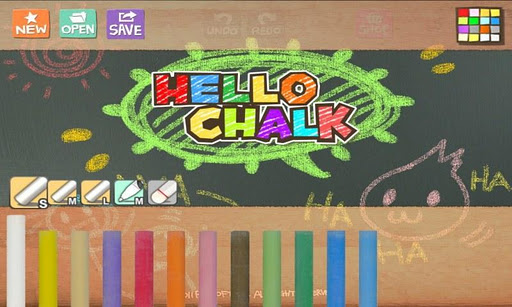
"Hello Chalk" is an easy & fun drawing APP.
Its good for drawing lunch menu, todo list, drawing funny things and etcFeatures- Realistic look & feel of chalks, black board and board pens- Cool stroke sound - Intuitive user interface- In-app-billing items for more functionsCheck out our hello drawing series.
- Hello Crayons- Hello Color pencils- Hello ChalkFacebook Page:http://www.facebook.com/pages/Hello-Chalk/217927548240939===================================================================This app requires following mandatory permissions1.
Read/Write External Storage - Modify / delete the contents of the SD card - Test Access to Protected Storage -> Save your app-drawn artwork (picture) to SD card or protected storage2.
Other - Full network access -> Share pictures on social networks such as Facebook - Google in app billing services -> Use Googles in app billing service to purchase sketches and full versions======================================================================This is the notice for updated version of Hello Series and Water Color Pencil app, related to function of Image Save to External Storage.If you have device with Android JellyBean or previous version, when you save image to exteral storage, image files will be saved to exteral storage folder with App Name and immediately you can show that image on Gallery.
(This is the conventional rule of older version of Hello Series and WCP app.)If you have device with Android KITKAT, when you save image to exteral storage, image files copied on Camera Folder of your external storage.
Surely, you can see your image on Gallery.
If you got the toast message Cannot Save To Camera Folder when save image, please execute basic Camera app of device and make one or more photo.
After that, you can save image to camera folder successfully.
https://andro.io/app/hellochalk
 Power 100


Android app profile
Hello Chalk for Android – Latest Version & Features
by Raysoft.co
★★★★★
(0 ratings)
Rate this app
How do you feel about Hello Chalk?
Thanks for your feedback!
> 2.2k
Monthly Downloads
~$900
Estimated Cost
Screenshots









