
Generic viewer is 2D/3D viewer for Aveva Marine(Avevas CAD for shipbuilding design) and is for Tribons GEN file for ship structure.GEN files which have ship bodys 2D/3D outline information can be viewed on your smart phone or tablet [Characteristics]1.
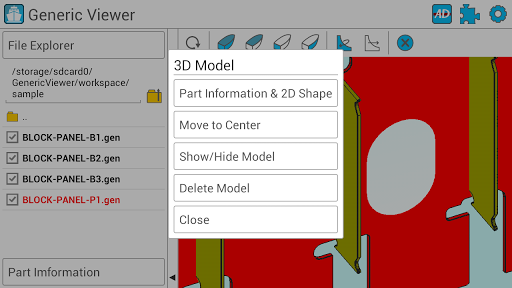
3D Viewer - Selected parts can be moved to the center or to the 2D viewer - Zoom-in/out, panning, rotation are possible - ISO view, Deck view, Frame view, Long view are provided.
- The information(Block/Panel name, WCOG etc) of the selected part can be viewed.
- various menus are diplayed by pressing on the gen file or directory in the explorer.2.
2D Viewr - Outer contour of shape/Hole/Marking is displayed as 2D image - Markings can be toggled - Zoom-in/out, panning, rotation are possible3.
Settings (1) Basic settings - working directory can be set.
- The sensitivity of rotation/panning/zooming can be adjusted.
(2) 3D Model settings - the color of the selected part can be changed on the file explorer.
- the color can be set according to the parts wideness.
(3) 2D Marking settings - Only required generic files marking information can be viwed by setting on the 2D viewer.
(4) Assembly directory wizard - Multiple gen files from the specific directory can be structured as like assembly in the working directory.
(5) Plugin - Generic viewer has plugin which makes generic file interface from the shipbuilding companys system.
- Each shipbuilding company can make each own interface between drawing system and generic viewer by customizing the viewer.
https://andro.io/app/gviewer
 Power 100



Android app profile
Generic Viewer for Android – Latest Version & Features
by Dokon Jang
★★★★★
(0 ratings)
Rate this app
How do you feel about Generic Viewer?
Thanks for your feedback!
> 2.2k
Monthly Downloads
~$900
Estimated Cost
Screenshots









