
"GD-CRM Little Helper" is a tool provided by [GD-CRM Customer Relationship Management System].
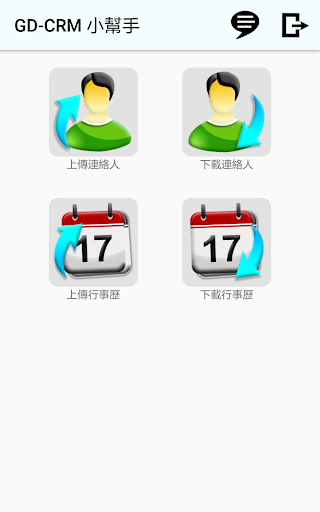
You can use this tool to connect [contacts] or [calendar] in your mobile device.The relevant information is uploaded to the GD-CRM system or downloaded from the GD-CRM system to the mobile device.1.
Contact synchronization 1.1 Upload contact Read the contact information in the mobile device, and start uploading after the user selects the contact to upload.
When uploading, it will first check whether there is a duplicate name in the GD-CRM system.
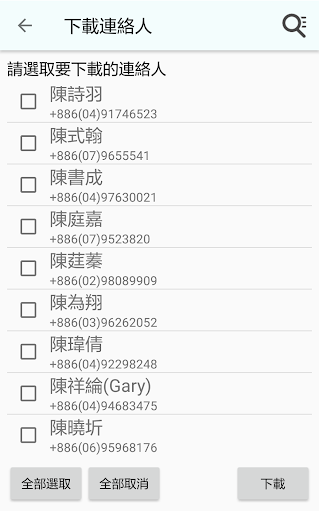
If there is a duplicate, the related prompt message will be displayed. 1.2 Download Contact After checking the scope of the data download, the user can download the selected contact information to the mobile device through the query interface.2.
Calendar synchronization 2.1 Upload calendar After confirming the range of the calendar upload, the user can upload the calendar information of the selected range to the GD-CRM host through the query interface.
If there is a duplicate, the related prompt message will be displayed. 2.2 Download Calendar After the user can confirm the range of the calendar download through the query interface, the user can download the selected calendar information from the GD-CRM host to the mobile device.
If there is a duplicate, the related prompt message will be displayed.
https://andro.io/app/gd-1tkqz
 Power 100


Android app profile
GD-CRM 小幫手 for Android – Latest Version & Features
by 通用數碼股份有限公司
★★★★★
(0 ratings)
Rate this app
How do you feel about GD-CRM 小幫手?
Thanks for your feedback!
> 2.2k
Monthly Downloads
~$900
Estimated Cost
Screenshots









